
 Spanish
Travel Orders v2
Handle business trips from request to payout


 Help
Help
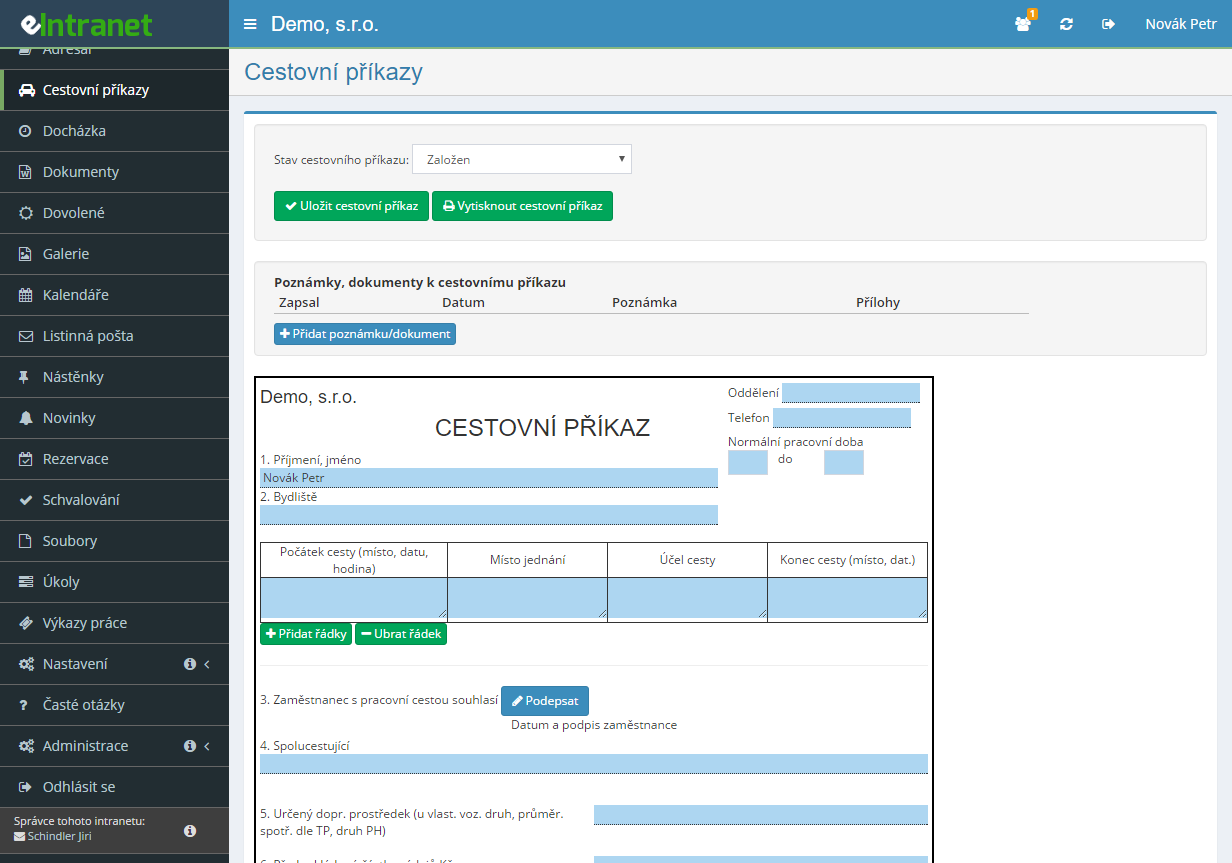
Create a travel order for a business trip within the country or abroad in just a few minutes. The form mirrors the familiar paper version, so every employee finds their way around it on the first try.
A request travels from the employee to the direct supervisor, senior manager and accountant. You decide which approval stages to use according to your company rules.
Meal allowances, pocket money and travel fares are calculated from the valid rates and the length of the trip. Allowance reductions for provided meals and currency conversion for foreign trips happen without any manual work.
Every stage of the travel order is confirmed with an electronic signature by the relevant participant. Paper forms circulating for signatures give way to a verifiable digital trail.
What you can use the travel orders module for
-
Business trip request before departure
The employee fills in the purpose, meeting place, means of transport and expected advance. The manager has everything needed for approval in one place.
-
Expense settlement after the return
Once back, you add accommodation, transport, meal allowance and other expenses. The module immediately works out how much to reimburse the employee or how much they owe.
-
Compensation for a private vehicle
Mileage is calculated from the kilometres driven, fuel prices and the rates stored for the given year. Just enter the route.
-
Allowance rates by country and year
You keep your own meal and pocket money rates for every country and year. A change in regulations is solved with a single update of the settings.
-
Pre-filled default values
Set up the department, address, phone, usual route and approver for each user in advance. A new travel order then practically fills itself in.
-
Status overview and accounting control
Filter orders by status, from a draft all the way to final settlement. An accountant with dedicated rights checks the settlement and confirms the payment of compensation.
-
Printing and data export
Print a finished travel order in a form true to the original, or export the data to Excel for further processing in payroll.
-
Change history and notes
For every trip you can see who edited the record and when. Notes keep the communication between employee, manager and accounting in one place.
Electronic Travel Order Tracking and Approval – your reliable tool for managing business travel in one cloud solution. It allows you to quickly enter, approve, and expense travel orders, eliminating paperwork and reducing administrative time by up to 40 %.
Key features and benefits:
- Request Entry – a form that mimics a printed document, which can be filled out online on mobile devices or desktops.
- Electronic Approval – direct communication with managers, automated notifications, and real‑time status tracking.
- Expense Reconciliation – integration with accounting and HR, automatic calculations of income tax or VAT, multi‑currency support for international trips.
- Travel Management Overview – a central database of domestic and international services, export to Excel or PDF, and archiving in compliance with GDPR.
- Error Reduction – budget checks, automated compliance verification, minimizing the risk of audit penalties.
Implement this module and gain transparency, time savings, and reduced travel expenses. Add eIntranet.net to your ERP package today!
Frequently asked questions
When filling in the travel order, the "Exchange rate conversion date" field is filled in - it is therefore possible to enter either the date of handover of the advance payment (if paid) or the date of the start of the business trip.
Travel Orders module, in the Compensation Settings section, it is necessary to define the amount of compensation by country, or by place of occupation (e.g. if the CZ card is created, the amount of compensation valid according to Czech legislation is entered into this card, including foreign trips).
Using the "Add country" button, the card of the given country is created and the module administrator fills in the relevant amounts for both domestic and foreign trips.
Registration is non-binding and includes a free 14-day trial of the application.