
 Spanish
Address book
Why contacts belong to the company, not to phones


 Help
Help
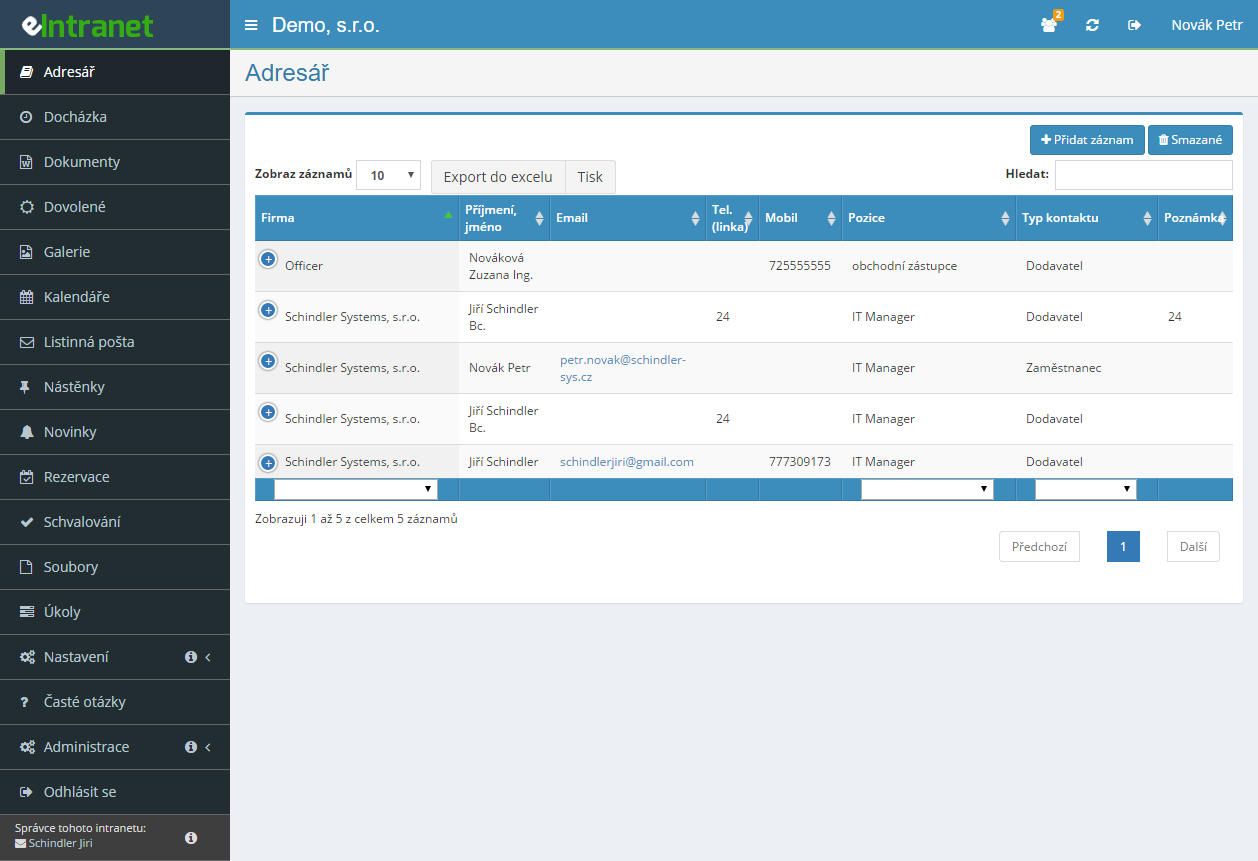
The address book keeps contacts for customers, suppliers and colleagues, complete with photo, telephone, e-mail, address and website. Company, position and contact type are entered once and picked from a list afterwards.
Upload contacts from Outlook as a VCF file or a whole ZIP archive. The system spots duplicates itself and offers three choices for each: skip, overwrite, or add as a new record.
The filter narrows the list to one company or category, while the Search box works through the table as you type. An active filter turns the heading red, so half the directory never goes missing on you.
Have the name, mobile, landline and e-mail texted to your own number. Handy on the way to a meeting, when opening a browser is the last thing you want.
A simple record of addresses in a company - address book
-
A contact card with a photo
Upload the image in the dialog, crop it and rotate it if needed. A face next to a name helps new colleagues most of all.
-
Companies and addresses shared across records
Enter a company once and simply select it for everyone else. The directory then never drifts into three spellings of the same firm.
-
vCard to download or attach to an e-mail
Ticked contacts download as VCF, several of them as a ZIP. The same selection can go to a colleague by e-mail.
-
Excel export and printing
The table respects the filter you set, so you print exactly what you filtered. Arrange the columns beforehand as you like.
-
Four permission levels and a recycle bin
From read-only up to full administration. A deleted contact is not gone for good, you restore it from the bin.
- A single repository for all corporate contacts – no duplicate databases, just one place for all data.
- Intuitive export to Excel – easily prepare lists for marketing campaigns or business analysis.
- Send the requested contact via SMS – instant access to key information directly on mobile, ideal for quick decision-making in the field.
- Continuous updates and backups – data is always current and protected against loss.
- Seamless integration with other ERP modules – link contacts with CRM, helpdesk or projects for a complete view of the client.
Frequently asked questions
Upload your photo in JPG format and size 600x600px.
Individual contacts from the address book can be sent to your mobile phone by SMS. Just click the telephone icon in the Actions column next to the contact you want.
The message contains the name, mobile, telephone and e-mail. Sending works only to Czech mobile numbers and assumes the SMS module is switched on.
Yes. The address book reads vCard files in versions 2.1, 3.0 and 4.0, either one by one or as a ZIP archive holding several files at once. The limit for a single uploaded file is 10 MB.
The system detects and converts the encoding itself (UTF-8, Windows-1250, ISO-8859-2), so exports from older Outlook versions do not end up with broken accents. Importing requires write permission.
The system finds duplicates itself and flags them in the preview before anything is saved. For each conflict the existing and the new contact appear side by side with the differences highlighted in colour.
You choose one of three actions: skip, overwrite, or add as a new record. Overwrite updates only non-empty fields, so the original contact does not lose data the new file happens to omit. At the end you get a summary.
No. The price of eIntranet depends solely on the number of users with access to the system, not on the number of records. Whether you keep three hundred contacts or thirty thousand, the amount is the same.
The address book is also part of every plan, just like all the other modules, so nothing is charged for it separately. Contact photos count towards the ordinary disk space of your plan.
Yes. Upload the photo directly in the dialog for adding or editing a contact, using the button for selecting an image. In the preview you can still crop it and use the Rotate button to set it straight.
A JPG of 600 × 600 pixels looks best. A photo is removed by ticking the box for deleting it while editing the contact.
Yes. A deleted contact is not removed for good but moved to the recycle bin. It can be brought back by a user with the highest permission level — reading, writing, deleting and restoring from the bin.
Deleted records are listed using the red Deleted button in the header of the contacts table, and restored from there.
The administrator decides in Settings → Address book, assigning each user one of four levels: no access, read, read and write, or full administration including deletion and restore from the bin.
Read permission on its own already allows downloading a contact as a vCard and texting it to yourself; write access is not needed for that. The permission switch saves the moment you click it.
The buttons for downloading and sending a vCard only become active once at least one contact is selected. Tick the box in the actions column next to the record you want, or the box in the table header to select them all.
If the Add record or Import VCF button is inactive, that is a different matter: those functions require read and write permission, which the administrator assigns in the module settings.
Yes. Above the contacts table there is an Excel button for downloading a file and a Print button. The Columns button lets you choose beforehand which details should appear.
The export respects the filter currently applied and the text entered into the Search box, so you download exactly the selection you have on screen, not the whole directory.
Registration is non-binding and includes a free 14-day trial of the application.