

 Slovak
 Hungarian
 Polish
 German
 Spanish
Work schedule
How the work schedule makes managing your team easier
 Help
Help
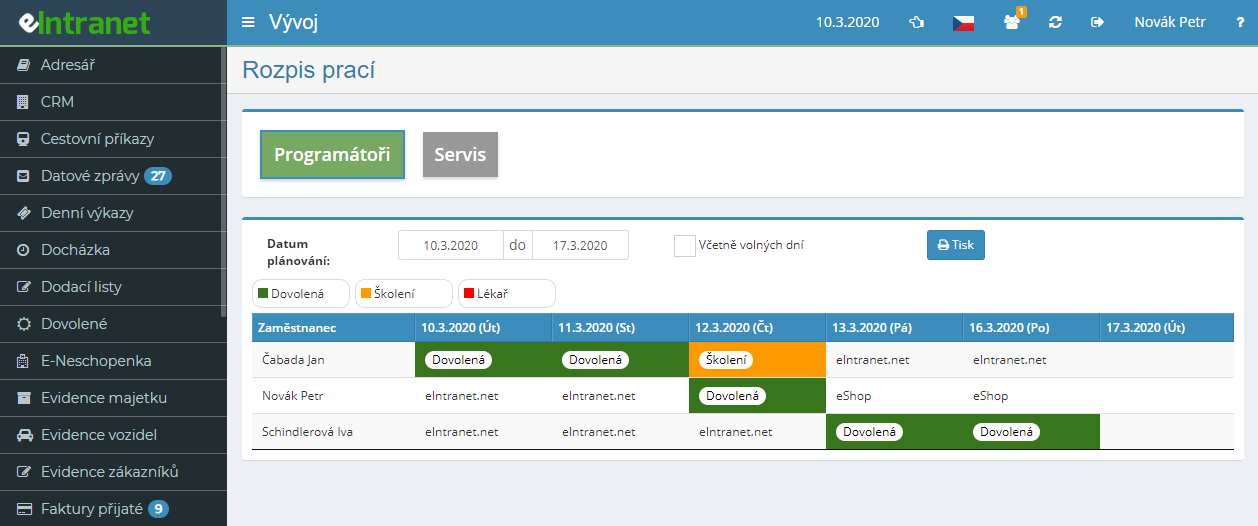
Put together a work schedule for the whole team in a few minutes. Employees sit in rows, individual days in columns, and each cell holds what that person is doing on that day. You see the entire weekly work schedule at a single glance.
Split people into teams the way it makes sense in your company - assembly, service, maintenance, office. Each team has its own schedule, its own colour categories and its own permission settings.
Predefine colours for types of work and drag them into the calendar via drag and drop. One look tells you who is on assembly, who is on service and who handles admin.
Pick the relevant employees and e-mail them the finished schedule. Everyone receives a direct link that takes them straight to their own roster for the chosen period.
What you can use the work schedule module for
-
Plan for any period you need
Enter a from-to date and the calendar fills up. A week ahead is enough, or cover a whole month - the range is up to you.
-
Permanent team members added automatically
Tick automatic inclusion for your regular staff and every new period creates their empty entries on its own.
-
Several activities within one day
When a worker handles one job in the morning and another in the afternoon, enable multiple fields per day and record each activity separately.
-
Show weekends and holidays too
Planning weekend shifts or duty rosters? Tick the days off and Saturdays, Sundays and holidays appear in the schedule.
-
Print the schedule for the notice board
Print a weekly overview and post it in the workshop or office. People see their plan without logging into the system.
-
Permissions set right down to team level
For each person you decide whether they only view the team, follow all rosters, or may plan them. Sensitive schedules stay only with those who should reach them.
Links to other modules
The work schedule does not stand alone - it ties staff planning to company logistics.
Electronic Work Schedule is a key tool for clear planning of employee work activities. It allows you to quickly create a weekly or calendar schedule that meets the needs and habits of your company.
- Creating work teams – easily define groups by project or department and assign them specific tasks.
- Assigning service vehicles – optimize logistics by assigning each work team the required vehicle directly in the schedule.
- Sending the schedule via email – automatically deliver the plan to employees and managers, eliminating paper copies and increasing transparency.
- Flexible calendar periods – set the range according to seasonal fluctuations or project milestones without needing manual retyping.
- Integration with ERP and CRM – data from the schedule syncs with other eIntranet.net modules, minimizing errors and saving time.
Speed up the planning process, reduce the risk of overlaps, and ensure smooth operation of every shift. Try Electronic Work Schedule today and bring clarity and efficiency to your team.