
Boards
News the whole shop floor has to see does not belong in e-mail


 Help
Help
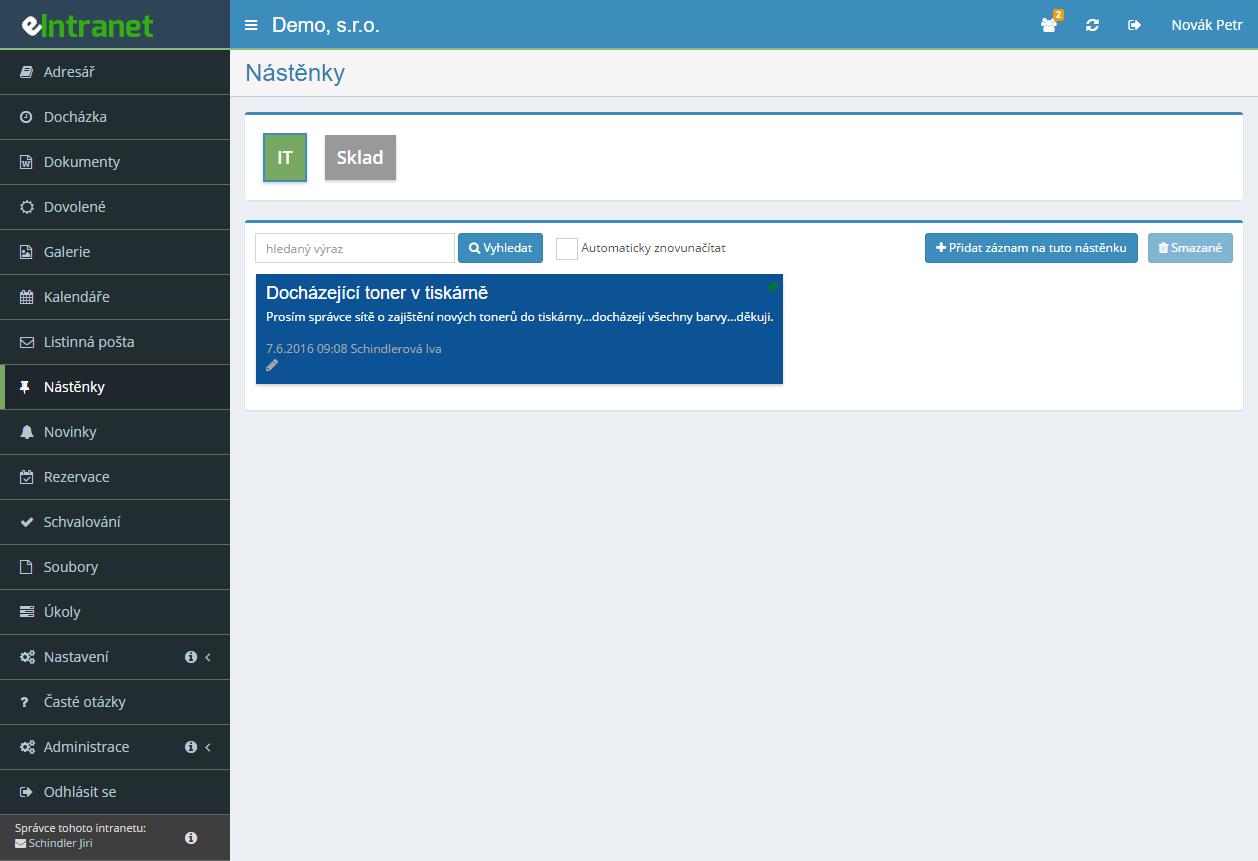
Create as many themed boards as you need – operations, warehouse, IT requests, the lunch menu. Access is set on each one separately, if you like by job position.
A red tick on a post means unconfirmed, a green one confirmed. Click the green tick to list everyone who has confirmed the post, date and time included.
Everyone switches on their own subscription per board. For something genuinely important you tick E-mail everyone and the message also reaches those who have no subscription.
Comments stay with the topic they belong to. They cannot be edited or deleted, so they build a readable record of how matters developed.
What you can use the boards module for
-
Unread counter on every tab
Beside each board name sits a number showing the posts you have not seen yet. You can tell at a glance where something is happening.
-
Colour coding for priorities
Either the author picks a colour from the palette, or an administrator predefines fixed colours with labels – red for urgent, blue for information.
-
Attachments right on the card
Drag up to 60 files onto a post, each up to 100 MB. Images appear immediately as thumbnails.
-
Move a post to another board
When a message lands on the wrong board, one dialog moves it. Nothing has to be typed again.
-
Automatic refresh every minute
On a fast-moving board switch on auto-refresh. A countdown to the next refresh runs beside the checkbox.
-
Search across titles, text and authors
One field searches all three at once. Deleted posts also stay recoverable.
The Easy Information Sharing module enables you to quickly and efficiently pass key messages between employees—from operational alerts and warehouse notices to IT requests. The virtual company bulletin board serves as a central hub where everything is gathered and instantly available to all relevant teams.
Main features and benefits:
- Create themed boards for departments or projects—each group gets its own space without unnecessary disruption to other users.
- Precise access control—only authorized employees can read, edit, or comment on posts.
- Clear read receipts and the ability to add comments—promotes transparency and subsequent action tracking.
- Color-coded labeling and easy post movement—quick orientation even with large volumes of information.
- Automatic email notifications for new messages—you’ll never miss an important update.
This module reduces the time needed for internal communication by 30 % and minimizes the risk of errors caused by inadequate information sharing. Simplify operations, strengthen collaboration, and save time—try eIntranet.net bulletin boards today!
Frequently asked questions
The automatic notification goes only to users who have ticked New posts and changes by e-mail on that board. Anyone who has not switched on the subscription will not learn of a new post by e-mail.
To reach everyone with access to the board regardless of subscription, tick E-mail everyone when creating the post. That option is available only on a new post, not when editing.
The read-confirmation feature has to be switched on – it is set on the individual board, not on a single post. Every post then carries a tick icon on the right.
A red tick means unconfirmed, a green one confirmed. Clicking the green tick opens the Confirmed reading dialog listing names, dates and times. Hovering over it shows the same overview as a tooltip.
No. Clicking the tick evidences that the user opened the post and pressed a button – it does not evidence any verification of knowledge, which health and safety rules normally require of training. For safety and fire training a board therefore replaces neither the training nor its documentation.
Where it does make sense is operational information and internal notices where showing that they were made available is enough. Whether the record suffices for your purpose is for your lawyer or safety adviser to judge.
An unlimited number, and no. Neither the number of boards nor the number of posts affects the price – you pay solely for users with an account in the system.
Even so, start with one company-wide board and add more only once it starts filling with content most people are not concerned with. Twenty boards, fifteen of them empty, will reliably put people off the module.
You have no access rights to it. The module only shows as tabs the boards on which you hold at least Read permission.
The fix is on the module administrator's side: under Settings → Boards they grant you access either individually or through your job position. The second option is more practical, because it also covers future employees in the same position.
Yes, if you hold Read/Write permission or higher on that board. Any post can be edited regardless of who wrote it.
That is a deliberate decision: a board is a shared space, not a personal inbox. If the Add record button stays greyed out for you, you only have Read permission and can merely view and comment.
Yes. Deleted posts are not removed from the database – they remain available under the Deleted button in the board's control panel.
Both that button and deletion itself require the Read/Write/Delete/Restore permission level. If you do not have it, ask the board administrator to restore the post.
In the Files module, under the Dashboard section. That applies to attachments on posts and on comments alike. An administrator can manage them centrally there.
Their volume also counts against the subscription's storage: 0.5 GB per user on basic, 2 GB on normal and 4 GB on extra. A single post can carry up to 60 files, each up to 100 MB.
Yes, but an administrator has to switch the feature on for that board. You can tell because a drawing-pin or four-arrow icon appears on the posts – that is what you grab the card by.
The position saves itself after the drag. Dragging works only within one board; to move a post elsewhere use the right-arrow icon and the Move record to another board dialog.
A board is for content that should stay up permanently and remain findable at any time – operating instructions, contacts, procedures. News is for notices with a limited validity, where you also set a post type (announcement, deadline, task) and a display period.
In practice they complement each other well: news announces that something is happening, the board holds what should still be at hand a month later.
Yes. Open the board you want as your default and tick the Default board box in the control panel. The setting saves immediately.
Alongside it, the Auto-reload option is useful: it refreshes the board every 60 seconds, with a countdown in MM:SS running beside the checkbox.
Registration is non-binding and includes a free 14-day trial of the application.