
Calendars
No more guessing when the meeting actually starts


 Help
Help
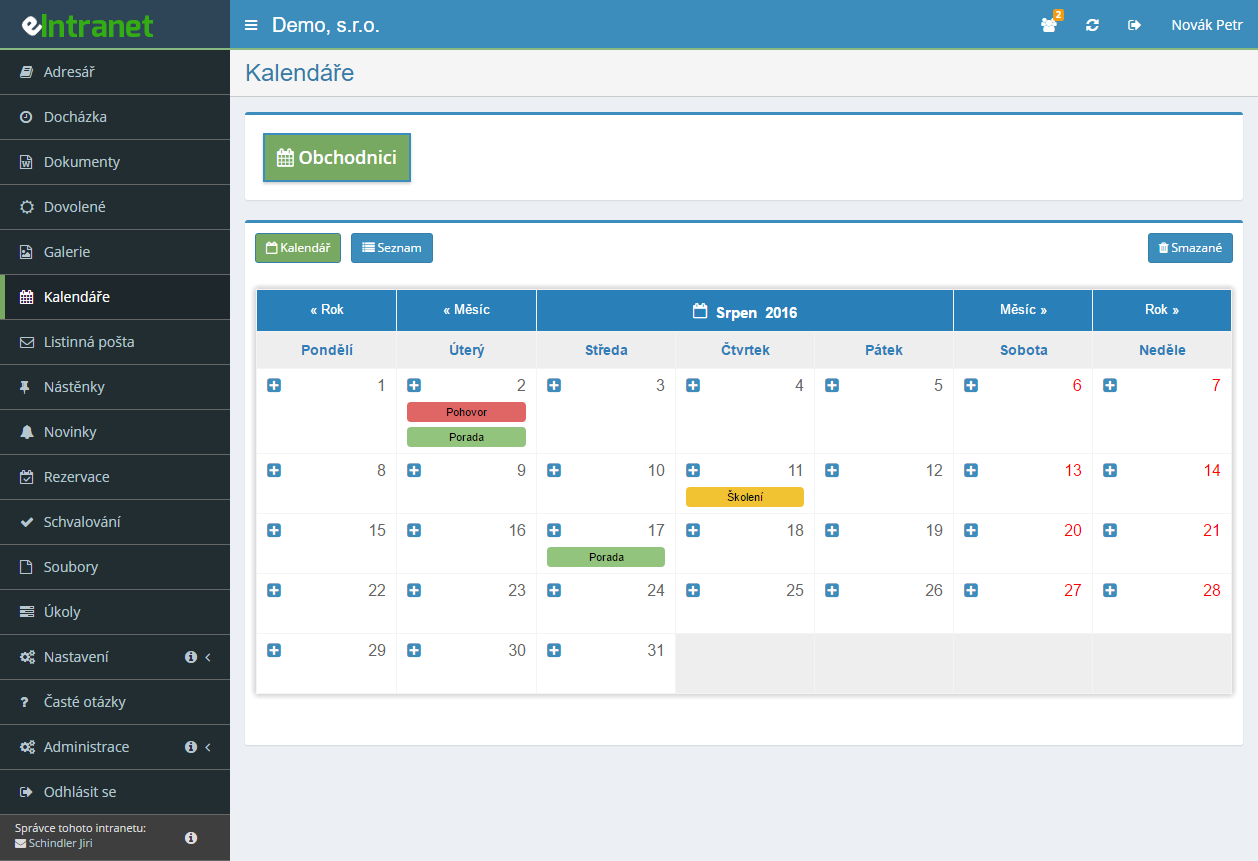
Set up a separate shared calendar for company events, for sales and for the IT team – as many as you actually need. Everyone then sees exactly the appointments that concern them.
Rights come in three levels: read, read and write, or full access including deletion and restore. The „Everyone“ option grants access to staff who have not even joined yet.
You decide how many minutes ahead the alert goes out – fifteen is prefilled – and who receives it. The event dialog then shows which addresses and numbers the reminder already reached.
Pick the direction of the Google link and forget about it. Appointments also connect to the One Calendar app on both Android and iPhone.
What you can use calendars for
-
Monthly overview and weekly timeline
One button switches between them. Move an appointment to another day by dragging it, extend it by pulling its bottom edge.
-
Recurring events
Daily, on selected weekdays, in odd or even weeks, on the fifteenth of the month or the first Monday of the month. Yearly recurrence covers anniversaries and inspections.
-
Event list with a date-range filter
The table view shows From, To, Name, Place and Created by. Export the filtered range to Excel or send it straight to the printer.
-
Book a meeting room straight from the calendar
Choose a booking calendar while writing the appointment and the system checks whether the room is free. Clashes surface before you save.
-
Recycle bin for deleted events
An appointment deleted by mistake is not gone. Anyone with delete rights finds it under the Deleted button and restores it with one click.
Shared Calendars Module enables smooth real‑time planning and coordination of events in a corporate environment. With a centralized approach, every employee can quickly view the company’s and their department’s schedules without having to navigate multiple separate applications.
Key features and benefits:
- Create purpose‑based calendars – from corporate holidays to IT or accounting projects, so each team sees only relevant events.
- Customizable permissions – administrators can assign different levels of access (view only, edit, or manage), minimizing the risk of unauthorized changes.
- Sync with personal calendars – integration with Google Calendar or Outlook ensures employees never miss a meeting even outside intranet.
- Automatic email or mobile reminders that reduce no‑shows by up to 30 %.
- Clear visualizations – daily, weekly, or monthly views enable quick resource planning and fewer scheduling conflicts.
Try the Shared Calendars Module on eIntranet.net and simplify corporate planning with a single integrated solution. Add it to your ERP package today!
Frequently asked questions
Yes. You can create any number of calendars – one for company events, others for the sales department, the IT team or planned shutdowns. They are created under Settings → Calendars with the Add button, and only the name is mandatory. In the module you then switch between them using the top bar.
Yes. Rights are granted per calendar in three levels: Read, Read/Write and Read/Write/Delete/Restore. They are set under Settings → Calendars by clicking the button in the relevant permission column.
The Everyone option also grants the right to users who do not exist in the system yet. Unticking it, however, removes the tick from every individual user too, so the selection then has to be made again.
Yes, and in both directions. In the calendar settings you pick the target Google calendar and one of four modes: no synchronisation, eIntranet.net → Google, eIntranet.net ← Google, or two-way.
Changes are sent through a queue in batches of 200 events and a failed attempt is repeated up to eight times, so a short internet outage will not cost you entries. In two-way mode, the change made where the record originated takes precedence.
Yes, over the CalDAV protocol. In the app – typically One Calendar for Android and iPhone – you enter your eIntranet login e-mail, your password and the server address, which is your eIntranet address followed by /CalDAV/server.php.
An administrator has to enable access first under Settings → Calendars using the Allow CalDAV access for applications option. A step-by-step guide sits in the module behind a button in the card header.
Yes. On any event you can tick Send reminder, enter how many minutes before the event it should go (15 is prefilled) and choose the recipients. The delivery method is selected separately – e-mail, SMS or both.
SMS requires a correctly filled phone number on the user's account. The event edit dialog then shows the addresses and numbers the message already reached, with the date and time of sending.
You cannot do it in bulk. Recurring events are stored as separate records, so editing one occurrence leaves the others untouched. For a permanent change, open any occurrence, click Delete all recurrences and create the event again with the correct details.
The Recurrence section is also available only when creating a new event, never when editing an existing one.
A maximum of 4 years from the current date. When creating the event you fill in the Repeat until field, which enforces that limit. The options are daily, weekly (every week, odd weeks only or even weeks only, on chosen days), monthly by date and by position of the weekday, and yearly.
Yes, provided an administrator has enabled it on that calendar. Files are dragged straight into the event dialog or uploaded with a click. It is handy for meeting materials, presentations or a map to the venue.
The Add files option sits under Settings → Calendars in the dialog for creating or editing a calendar. If you cannot see the attachment field, it is not switched on for that calendar.
Yes. Deleted events are not removed permanently – you find them under the Deleted button in the card header and put them back with one click.
Both that button and deletion itself are available only to users with the Read/Write/Delete/Restore permission level. If you cannot see it in the module, ask an administrator to adjust your rights.
Yes, if you have the Reservation module active and an administrator has enabled the Allow bookings from the calendar option on that calendar. A Booking section with an In booking calendar field then appears in the new-event dialog.
Once you pick the booking type, the system automatically checks whether the slot is already taken. If it is free, the event and the booking are saved together.
Because you have not been granted access rights to any calendar. The module only shows calendars for which you hold at least read permission.
The fix is on the administrator's side: under Settings → Calendars they add you to the relevant permission column on the specific calendar. The same cause is behind being unable to write or delete.
Yes. The tabular List view has an Excel button for XLSX export and a Print button for a printable layout. Exactly what is currently filtered gets exported – so you can narrow the period first using the Show only from and to fields.
There is also a separate CSV export for Google Calendar; it downloads export-eIntranet-calendar.csv with the columns Subject, Start date, Start time, End date, End time, All Day Event, Description, Location and Private.
Registration is non-binding and includes a free 14-day trial of the application.