

 Slovak
 Hungarian
 Polish
 German
 Spanish
Paper Mail
No letter disappears between the desk and the filing cabinet
 Help
Help
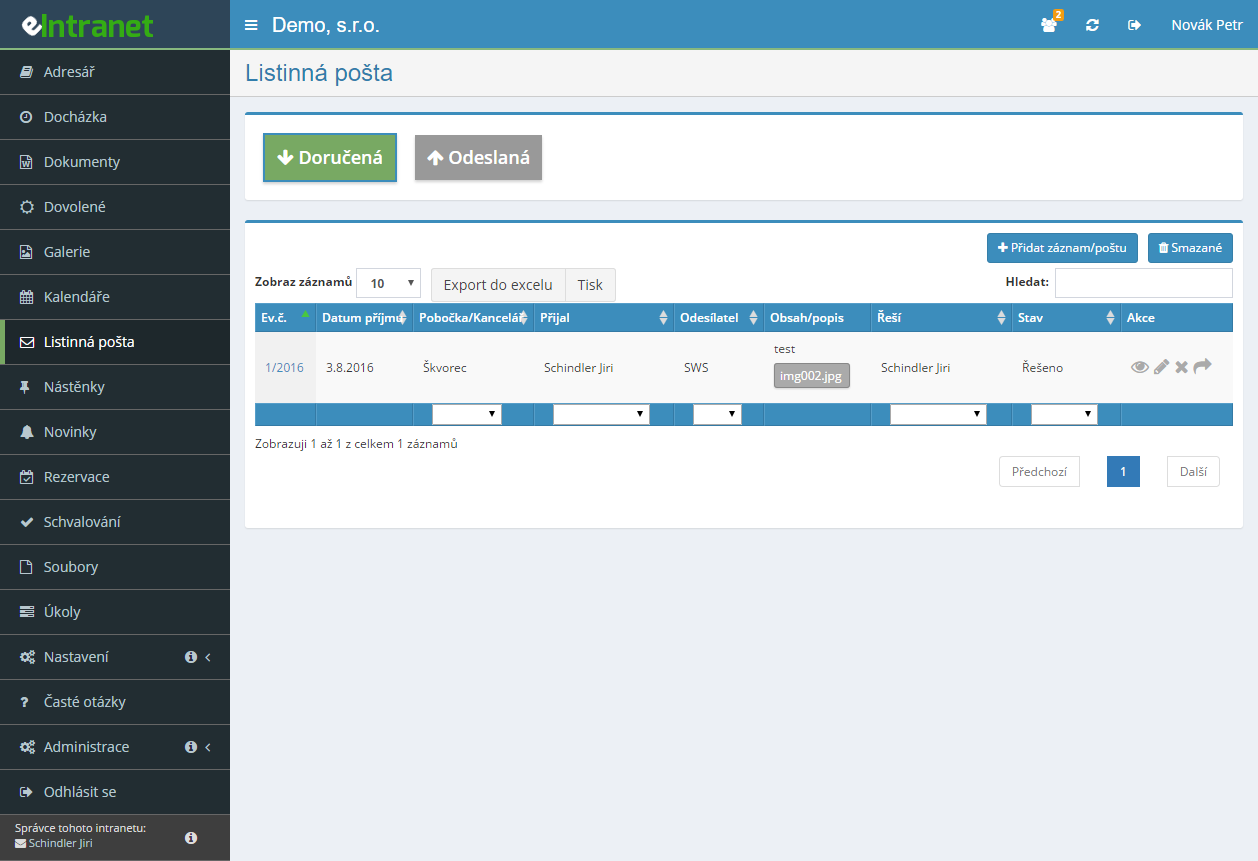
An electronic paper mail register replaces the bound inwards book. Every item gets a reference number, a date, a sender or addressee, a delivery type and a description of the contents.
Assign a lead handler plus any colleagues involved and watch whether the item is New, In progress or Closed. Nobody has to ask where last week's envelope ended up.
The system builds a PDF despatch sheet from items sent over the past fourteen days. The sender details and customer card number are remembered from last time.
New messages from the data box can be filed into the mail register automatically and given a default handler. From the detail you jump straight back to the original message.
What you can use the paper mail module for
-
Scanned documents held with the item
Drag the scanned letter onto the record. Attachments can then be downloaded one at a time or all at once.
-
Addresses from CRM without retyping
Pick the sender or addressee from your list of companies, branches and contacts. Street, town and postcode fill in by themselves.
-
Address labels at 70 × 42.3 mm
An A4 sheet holds a 3 × 7 grid, that is 21 labels. Addresses are offered from items you have already sent.
-
Notes with an audit trail
Every note carries an author and a timestamp, building a history of where the document travelled inside the company.
-
Send a letter into the approval process
An incoming invoice or contract goes from the item detail straight into approval.
-
Filters, Excel export and print
Search by period, handler, status or full text in the description. Export and print both respect the filter you set.
Electronic record of incoming and outgoing paper mail is a key tool for managing corporate correspondence in eIntranet.net. It allows you to quickly record, track, and archive every letter – from ordinary to valuable shipments – without the need for paperwork.
Main features and benefits:
- Complete recording of incoming and outgoing mail – fast search by date, type or sender.
- Expanded control of shipment type (ordinary, registered, valuable, package…) and choice of domestic or international rate.
- Integrated approval – the record is automatically forwarded to responsible staff for electronic signature or archiving.
- Option to directly transfer data messages to an external mail service, eliminating manual entry and reducing error risk.
- Reduction in time required for correspondence processing by up to 30 % thanks to automated workflow.
Use this module to optimize internal communication, increase transparency, and comply with legal requirements for mail archiving. Add electronic mail recording to your ERP platform today and simplify everyday operations.
Frequently asked questions
An ordinary trading company usually is not. In the Czech Republic the duty to run a records-management service falls mainly on public-sector originators – state bodies, municipalities, schools and similar entities.
Companies are treated as private originators: they need not run a records-management service, but they must retain certain categories of document. Whether the duty applies to your organisation is a question for a lawyer.
Yes. Up to 60 files can be attached to one record, each up to 100 MB. Drag them into the dialog with the mouse or pick them from disk with a click.
The record detail then has a Download all button that saves every attachment to your computer one after another. The module needs no scanner of its own – the one already in the office will do.
Yes, provided the Data Boxes module is active. In the paper mail settings you switch on automatic record creation for newly received data messages and name the default handler they go to.
In the detail of such a record a Data message link appears beside the tracking number, taking you to the original. Paper and electronic correspondence then sit in one overview.
Your permission for the module is below level 2. Only a user at level 2 or above can create new records; level 1 allows viewing only.
Ask an administrator to raise your permission. Reception staff who log the post are normally set to exactly level 2.
Only a user with permission level 3 or higher. That is deliberate: a register in which anyone can rewrite the delivery date loses its evidential value.
An assigned handler may, even at a lower level, change the branch, sender and status and add attachments and notes. Delivery type and tracking number require level 2.
Yes. Onto a single sheet you pick up to 10 items sent in the past 14 days and add cash on delivery, declared value and additional services. The system produces a PDF ready to print.
Payment method is chosen from five options – cash, bank transfer, franking machine, credit or postage stamps. The presenter, sender and customer card number are saved on first generation and prefilled next time.
Almost always the print settings. The labels are laid out for 70 × 42.3 mm in a 3 × 7 grid on an A4 sheet, so any rescaling shifts them.
Print in Chrome, set margins to "none" and the scale to 100 %. Check as well that the label sheets you use are exactly that size.
Yes, provided the Approval module is active. At the bottom of the incoming mail detail there is a button that hands the item into the approval process; you fill in its parameters and send it.
It is mostly used for incoming invoices, contracts and orders – documents somebody has to sign off before they are paid or signed.
Use the In content/description filter, which searches the text recorded against the item as full text. Narrow it further by period, handler, sender or status.
Above the table there is also a year selector – it offers years from the oldest record to the present, or an ---All--- option to search the whole history.
No. Deleted records are only flagged as deleted and stay in the database. A user with permission level 4 or higher displays them by clicking the Deleted button.
That is by design: a mail register you can erase without trace would be pointless when something has to be traced back.
No. The price depends solely on the number of users. The count of letters, parcels or attachments recorded has no bearing on it, and the number of records is not capped.
Watch the attachment storage, though: 0.5 GB per user on the basic tier, 2 GB on normal and 4 GB on extra. Anyone scanning all their incoming post should factor that in.
Registration is non-binding and includes a free 14-day trial of the application.