
Vehicle Records
Keep your whole fleet under control


 Help
Help
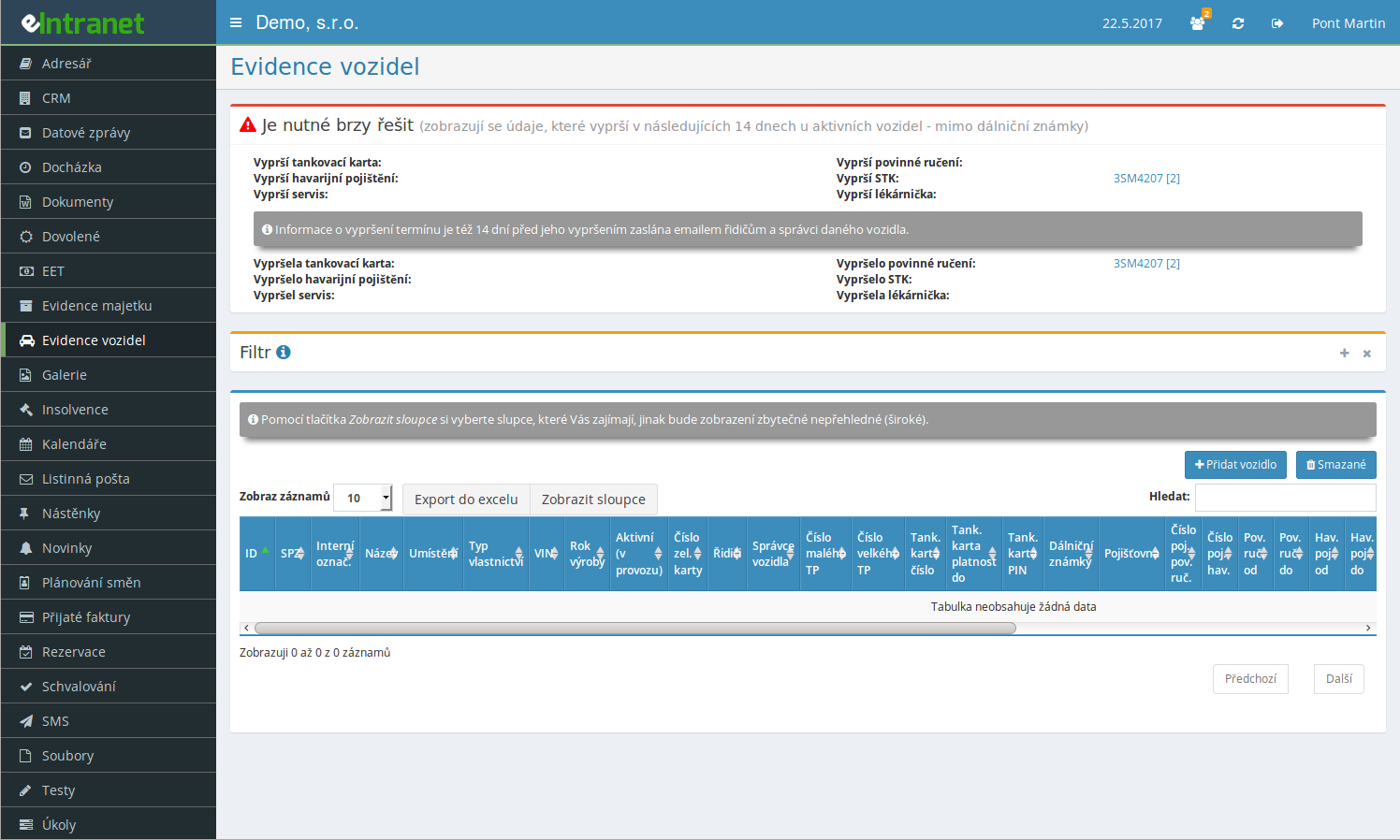
For every vehicle you track the plate number, VIN, type and year of manufacture – no paper folders, no spreadsheets. Find its driver and fleet manager in the vehicle detail within a couple of clicks.
An expiring STK inspection, insurance policy or motorway vignette shows up on the home screen, and an e-mail goes out as well – to the fleet manager, the driver, or both, depending on your settings.
Schedule service milestones by mileage or by months since the vehicle went into service. The odometer reading can come straight from the logbook or from GPS, so you never miss a deadline.
Log fuel, repairs and insurance costs. A summary screen shows what each vehicle cost, sorted by year.
What else you'll find in Vehicle Records
-
Motorway vignettes and tolls
For companies in the Czech Republic, vignettes can be bulk-imported from an EDAZ statement – the system matches them to vehicles by plate on its own, and you can print labels for them too.
-
Driver history
Keeps a record of who used a vehicle, over what period, and at what odometer reading.
-
Handover protocol
When handing over a vehicle, generate a Word or Excel document with the odometer reading, equipment list and a signature field.
-
Damage and unresolved accidents
For each case of damage you record the date and the claim number; unresolved cases stay visible right on the home screen.
-
Inspections for trucks and machines
On top of that, you track lifting-gear and tachograph inspections, with service limits set in kilometers as well as in months.
-
Custom optional fields
Add up to 11 columns to fit your company – text, number, date or a list selection.
-
Filtering and Excel export
Filter vehicles by insurer, driver or fleet manager, and export the whole table with a single click.
Software for electronic vehicle registration – efficient fleet management
This module allows companies to monitor and control the operation of corporate vehicles in real time, increasing productivity and reducing maintenance costs.
- Comprehensive vehicle records: You record basic information – VIN, license plate, technical parameters, and owner.
- Accident and service history: You store detailed data on incidents and repair work, facilitating audit checks and risk analysis.
- Automatic reminders for key dates: The system will remind you in advance of the expiration of STK, insurance, regular maintenance or toll stickers – so you never miss a critical interval.
- Centralized management and clear reports: Access data on all vehicles from one place with the option to export to Excel or PDF for internal reporting.
- Integration with ERP and accounting: All operating costs, repairs and insurance are automatically synchronized with the financial module of eIntranet.net.
Improve control over your fleet, reduce the risk of fines, and increase driver satisfaction – try the module today!
What Vehicle Records is and what it does for your company
Vehicle Records is an eIntranet module that keeps technical data, documents and deadlines for every company and private vehicle in one place – the STK inspection, mandatory liability insurance, motorway vignettes, service, fuel card and tires – and warns the fleet manager and the driver before any of it expires.
The module is used mainly by fleet managers, who maintain the whole register and add new vehicles, but also by drivers, who only get limited access to "their" vehicle. Access comes in seven levels – from no access at all, through seeing only the vehicles where the user is listed as driver, up to full administration with every right including deletion.
The home screen gathers the "Needs attention soon", "Expired" and "Unresolved damage" panels, so the manager doesn't have to click through dozens of vehicles one by one to see what needs handling first. The rest of the screen holds the table of all company vehicles, along with filters and quick search.
How Vehicle Records works in eIntranet, step by step
You create a new vehicle with the Add vehicle button on the home screen. Only two fields are required – the license plate and the name; VIN is optional and can be filled in automatically with the Read from VIN button, or, for companies in the Czech Republic, with the Read from vehicle register button.
The vehicle type you choose (car, truck, machine, van, motorcycle, bus/minibus, trailer up to 750 kg, trailer over 750 kg or semi-trailer) shows or hides extra tabs in the form – only trucks and machines get the lifting-gear and tachograph inspection tab, and for them tires are entered per axle instead of the usual four wheels of a car.
Next you fill in the STK, service and first-aid kit deadlines, the driver and fleet manager, and, as needed, the vignette, insurance, fuel card, warning vest and financing tabs. Saving with the Save & go to detail or Save & go to list button immediately puts the vehicle under active deadline monitoring.
From that moment the automation runs without further input: how many days, or kilometers, in advance a warning should fire is something you set once in the module's general settings. The "Needs attention soon" panel on the home screen then lists vehicle plates grouped by the type of approaching deadline, and the same information also goes out by e-mail – to the manager, to drivers, to both, or to no one, depending on the "Send expiry notice by e-mail" setting.
Every edit to a vehicle, every cost entry, service record, damage report and registry update is logged automatically in the Notes/Changes tab, so it stays traceable who changed what on a vehicle and when.
Where Vehicle Records gets its data: the vehicle register, VIN and the logbook
The fleet manager enters most data by hand, but in three places Vehicle Records can take some of the work off their hands. The Read from VIN button decodes the entered vehicle identification number and pre-fills the make and year of manufacture, as long as those fields haven't already been set manually. For companies in the Czech Republic there's also a lookup against the Vehicle Register – searched by VIN or by the registration certificate number, since the register can't search by plate – and the system offers to take over only the items that genuinely differ from what's already in eIntranet. The third route is bulk vignette import: you upload a file listing plates and validity dates, and the system matches the rows by plate and fills in the validity.
The module itself doesn't require any special hardware – plates, contract numbers and deadlines can all be typed in from the keyboard. The exception is when you want to track service not just by date but also by mileage: Vehicle Records can then read the current odometer value from a GPS unit installed in the vehicle (priced separately) or from the highest mileage entered in the Logbook module. You choose the source once in the module settings.
Data leaves the module in three directions. A daily e-mail reports on deadlines that are approaching or have already expired; printing a handover protocol generates a Word or Excel document with the odometer reading and equipment list when a vehicle is handed to a driver; and if the company has the Vehicle Reservations module turned on, only vehicles with the Available for reservation checkbox ticked in the form are offered there for booking. The whole vehicle table can also be exported to Excel at any time.
Everything Vehicle Records can do
Records and documents
- Basic data for nine vehicle types (car, truck, machine, van, motorcycle, bus/minibus, trailer up to and over 750 kg, semi-trailer), including VIN, year of manufacture and the date the vehicle entered service.
- Up to 5 rows of motorway vignettes or tolls per vehicle, plus, for machines, a unit number and issue date.
- Current and follow-on insurance – both mandatory liability and collision cover – with the follow-on policy taking over automatically on its start date.
- Up to 5 fuel cards, 0 to 40 warning vests, and tires – tracked by season for cars, and per axle for trucks and machines.
- An optional Financing tab with the loan contract number, installment amount and loan end date.
- Up to 11 custom fields defined in the settings, including yes/no, number, date, list, or a company pulled from the CRM module.
Operation, service and outputs
- A service plan with milestones by mileage and by months since entering service, including bulk setup of up to 11 milestones at once for selected vehicles.
- Damage records flagged as resolved or unresolved, with unresolved damage listed right on the home screen.
- Driver history – who used a vehicle and when, including the odometer reading at the start and end of each use.
- A cost overview by year, on two levels – a single vehicle's table and a summary for the whole fleet.
- Printing a handover protocol (Word or Excel) and printing vignette labels in four formats for companies in the Czech Republic.
- Public and internal vehicle attachments, up to 60 files uploaded at once altogether.
How to choose vehicle records software: what to ask before buying
Does the software tell vehicles apart by type, or does it force the same fields on a passenger car and a heavy truck? Vehicle Records shows only the relevant tabs based on the type you pick (car, truck, machine, van, motorcycle, bus/minibus, trailer, semi-trailer) – the lifting-gear and tachograph inspection tab applies only to trucks and machines, where tires are also entered per axle instead of the usual four wheels.
Can it track service not just by calendar but also by mileage? Without that, a heavily used vehicle can run past its service interval before a date-only reminder ever fires.
Can it pull technical data straight from the national register, or do you have to copy it from the registration certificate by hand? For companies in the Czech Republic, Vehicle Records can do this by VIN or registration certificate number.
Does it separate what a driver may see from what only the fleet manager sees? Seven access levels plus the special Driver right decide whether a user with driver rights sees the service history, damage and costs on "their" vehicle, or only the basic data, documents and insurance.
Can it print a handover protocol with the odometer reading and the equipment being handed over, or do you still write that up on paper by hand? And does it account for vehicles that will be offered for booking in the Vehicle Reservations module, or is that a separate list with no link to the main records?
Vehicle Records for a handful of company cars or a fleet of dozens
Vehicle Records isn't priced by the number of vehicles you register, but by the number of users with access to eIntranet – a meaningful difference from many other modules, since a fleet is usually run by just a few people regardless of how many vehicles it actually contains.
A small company with three to five company cars usually gets by with one user handling STK, insurance and service, plus maybe a second one who just keeps an eye on things. On the zaklad plan, in the band up to 10 users, that company pays €2.4 per user a month.
In a fleet with dozens of vehicles, it's the number of drivers with access that grows, not the number of managers – each driver only sees their own vehicles, so adding another user doesn't add to anyone's workload running the records. The question such a company usually asks is: do you pay the same for a driver who can only read their own vehicle's documents as for a manager with full rights? Yes – pricing is based on the number of users with access to the module, not on the level of their permissions.
For companies in the Czech Republic, the module also saves work on motorway vignettes – label printing and bulk import after a seasonal purchase pay off once you have enough vehicles that entering each one's validity by hand would eat up extra time.
What Vehicle Records costs
Vehicle Records is included in every eIntranet plan regardless of how many vehicles you register – you only pay for users who have access to eIntranet, not for the number of cars in your fleet.
A company with 12 users on the normal plan, in the band from 11 users at €2.1 per user a month, pays 12 × €2.1 – that's €25.2 a month for every module together, Vehicle Records included. As the number of users grows, the per-user price drops – from 101 users the normal plan is down to just €1.8.
The only extra cost tied directly to Vehicle Records is the optional GPS unit for tracking mileage, priced separately with a monthly fee per vehicle for its operation; without it, service can still be tracked by date alone, or by the odometer reading from the Logbook module.
You'll find the current price list for all plans at /en/pricelist.
Vehicle Records for free: what works without paying, and where the limit is
Two or three company cars and an Excel sheet with STK and insurance dates work as a makeshift register for quite a while, especially when one person is responsible for them and checks the deadlines regularly.
The limit shows up once a second car arrives with an STK due in a different month, a second driver needs their view of the vehicle restricted, or someone wants an automatic e-mail warning before a check gets forgotten. A spreadsheet doesn't alert anyone by itself, a shared calendar can't tell a driver from a fleet manager, and neither one pulls technical data straight from the vehicle register.
The same goes for motorway vignettes in larger fleets – after a seasonal bulk purchase, typing the validity dates into a spreadsheet by hand for dozens of vehicles takes far longer than importing a single file listing the plates.
You can try the module free for 14 days, no strings attached.
How to set up Vehicle Records
You'll find the module settings via the Settings link next to the heading on the home screen – visible only to the company administrator or a user who has been given rights to manage these settings. They're split into three tabs: Module rights, General settings and Custom fields.
In the Module rights tab you set one of seven access levels for each user; the choice saves immediately, with no further confirmation needed. In General settings you decide how many days, or kilometers, in advance approaching deadlines should be flagged, who gets the e-mail alerts, whether the odometer reading should be tracked as well, and whether to turn on the Financing tab or driver history.
The Custom fields tab lets you tailor the records to your own operation – you can add up to 11 fields of type text, number, date, list, or a company from the CRM module, and for each one choose whether it's required and whether it should also show up in the main vehicle table. Renaming a field that's already in use, or changing its type, permanently deletes the values entered in it so far.
You don't have to create an existing fleet vehicle by vehicle by hand – for companies in the Czech Republic, after entering the plate and VIN, running the lookup against the Vehicle Register and filling in the remaining technical data is enough, and after a bulk purchase, importing a single file listing the plates fills in vignette validity for all of them at once.
Frequently asked questions
Yes, Vehicle Records tracks the STK inspection, mandatory liability insurance, collision insurance, service (by date and by mileage), motorway vignettes, first-aid kits, lifting-gear and tachograph inspections, and the end of any vehicle loan – a warning appears on the home screen in the "Needs attention soon" panel and, depending on your settings, also goes out by e-mail.
How many days (or kilometers, for service) in advance, and whether the alert reaches the fleet manager, the drivers, or both, is something you set in the module's general settings.
Yes, besides the current policy you can enter a follow-on insurance policy for a vehicle – a future contract that continues on from the current one. On its start date, or once the current policy ends, the follow-on policy becomes the current one automatically and its fields are cleared.
You can enter a follow-on liability policy and a follow-on collision policy separately.
You can upload up to 60 files to a single vehicle at once – if you need more, upload them in several batches. The maximum size of a single file follows eIntranet's general limit for attachment uploads.
You can add attachments by dragging them onto the page or by picking a file, with public and internal attachments handled separately.
Only users with the highest access level – "Sees and can do everything, including delete" – can delete vehicles and their records (costs, service, damage). Lower access levels can only view or edit vehicles, without the option to delete them.
A deleted vehicle moves to the trash, which you open with the "Deleted" button above the main table.
Yes, if you turn on the "Track service by mileage too" option in the module settings. The system then compares the service deadline by date and by odometer reading, and warns you based on whichever comes first.
Depending on your settings, the current mileage comes from the GPS location, from the logbook, or from whichever of the two sources reads higher.
Yes, but only for companies where this integration is turned on, and only by VIN or registration certificate number – the register can't search by plate. The system compares the data against your records and offers only the items that genuinely differ for you to take over.
Overwriting a value that's already filled in always needs your own confirmation checkbox; filling in a missing value is pre-selected.
Yes, the module settings let you define up to 11 custom fields – text, a whole or decimal number, a date, or a list with your own values. For each field you can choose whether it's required and whether it should also appear in the main vehicle table.
Renaming a field that's already in use, or changing its type, permanently deletes the data already entered in it.
Yes, for companies in the Czech Republic, with the "Print CZ vignette labels" button on the home screen. You pick the label type (three sticker sizes or the Citizen CL-E321 printer), select vehicles into the prepared grid, and the system builds a preview page ready to print from your browser.
No, a user with the lowest access level only sees vehicles where they themselves are listed as the driver. If the special Driver right is also turned on in the settings, they see only a limited part of the detail for those vehicles – basic data, vignettes, current insurance, the fuel card and public attachments.
In this mode they don't see service, damage, vehicle costs or internal attachments.
Registration is non-binding and includes a free 14-day trial of the application.