
HelpDesk
Keep your customers' requests under control


 Help
Help
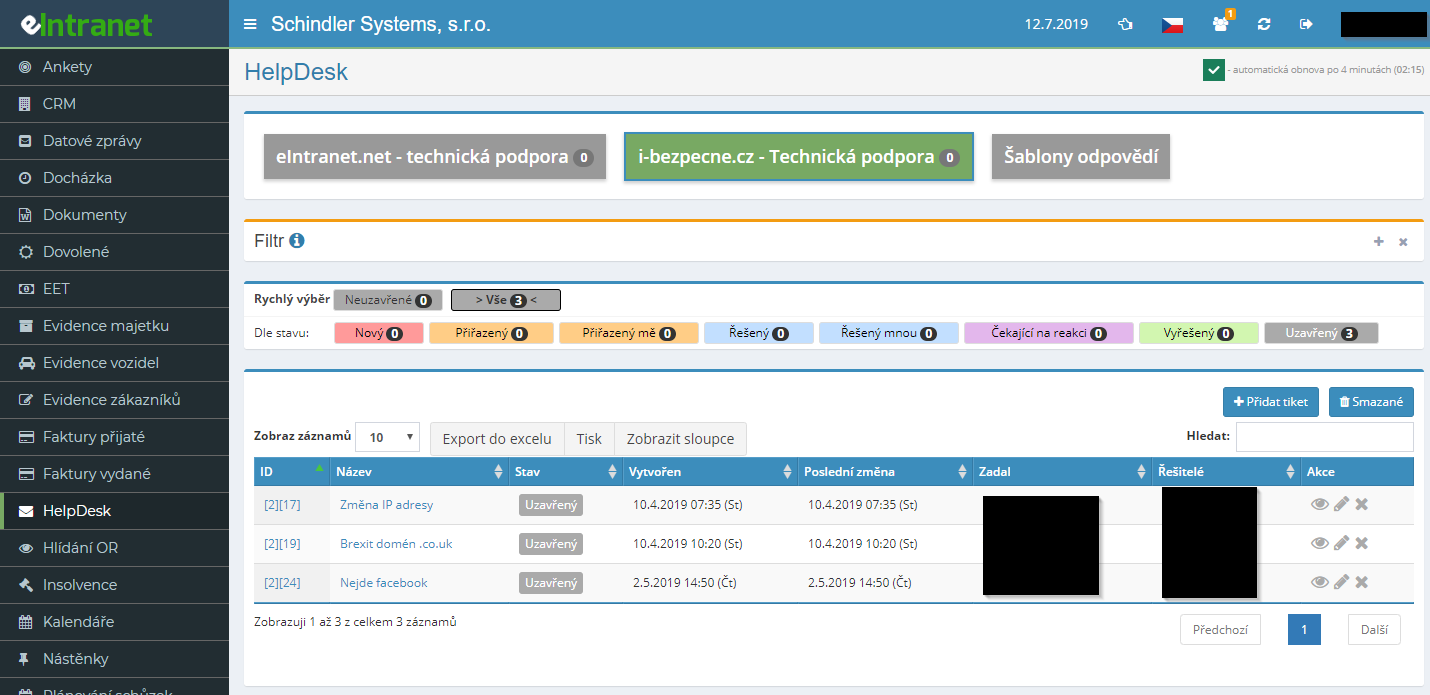
Do you have an overview of your customers' queries? Do you want to know when, who and how their questions were answered? Do you run an eshop, IT or other customer service? Do you want to keep track of the work of your employees? Use our HelpDesk module and save time and money.
The HelpDesk module logs incoming questions, faults and customer requests as tickets and guides each one from creation all the way to closure. Every ticket follows a clear status workflow, so you know exactly what is being solved and what awaits a reply.
Each project has its own e-mail address. A message a customer sends to it turns itself into a new ticket. The subject becomes the title, the body the description and attachments stay attached. No query ever slips through.
Separate IT support, maintenance or customer service into standalone HelpDesk projects. Each one keeps its own permissions, statuses, severity categories and e-mail address. The tab always shows the count of open tickets.
You spot a critical fault at a glance. Severity levels carry their own colour and recommended resolution deadline, so the team knows where to start. Tickets highlighted in blue also signal that the last reply came from the customer and needs your response.
What you can use the HelpDesk module for
-
Assigning solvers and tracking responsibility
You appoint a specific solver to each ticket. Dedicated filters such as "Accepted – me" or "In progress – by me" show everyone exactly what is on their plate.
-
Communication via notes and comments
You can e-mail a note to the customer, or keep it internal – internal notes turn yellow and stay hidden from the customer. All correspondence remains with the ticket.
-
Ticket and reply templates
Recurring requests are handled in a couple of clicks. A template pre-fills the title, text and attachments; you simply add the details and save.
-
Change history on every ticket
The resolution tab keeps a chronological record of every step – who acted, when and how. You can always trace why a ticket developed the way it did.
-
Custom columns to fit your needs
Add your own fields to tickets – text, date, number, list selection or a company from CRM. HelpDesk adapts to your specific operation.
-
Reporting work done on tickets
Record the time spent solving a ticket right on the ticket itself. You gain a basis for invoicing and an overview of the team's workload.
-
Filters, search and Excel export
Search by title, ID, date, requester or CRM company. Export the filtered list to Excel with a single button for reporting.
-
Automatic list refresh
The ticket overview refreshes every four minutes. You react to a new request without reloading the page by hand.
Integration with other modules
HelpDesk does not stand alone – it ties request resolution to business data and work reports across eIntranet.
Benefits of HelpDesk deployment - e.g. in e-shop:
- easily accessible and quick overview of customer requests
- awareness and substitutability of employees in the process of resolving requests
- overview of the work of employees and the support provided to customers
- finding out customer satisfaction
- providing up-to-date information for the customer on the process of resolving their request
Frequently asked questions
It is possible that you have some search criteria left within the filter. If any data is entered in the filter, the filter sign lights up red. So, open the Filter and remove the search criteria. If the filter is empty, the banner is black.
Registration is non-binding and includes a free 14-day trial of the application.