Shared files

Files

No more hunting through ten versions of the same document

One store for company material, reachable from anywhere through a browser and without another password.

Try it free Pricing

Available in languages: CZ EN DE HU PL SK ES Help
What you can use the files module for
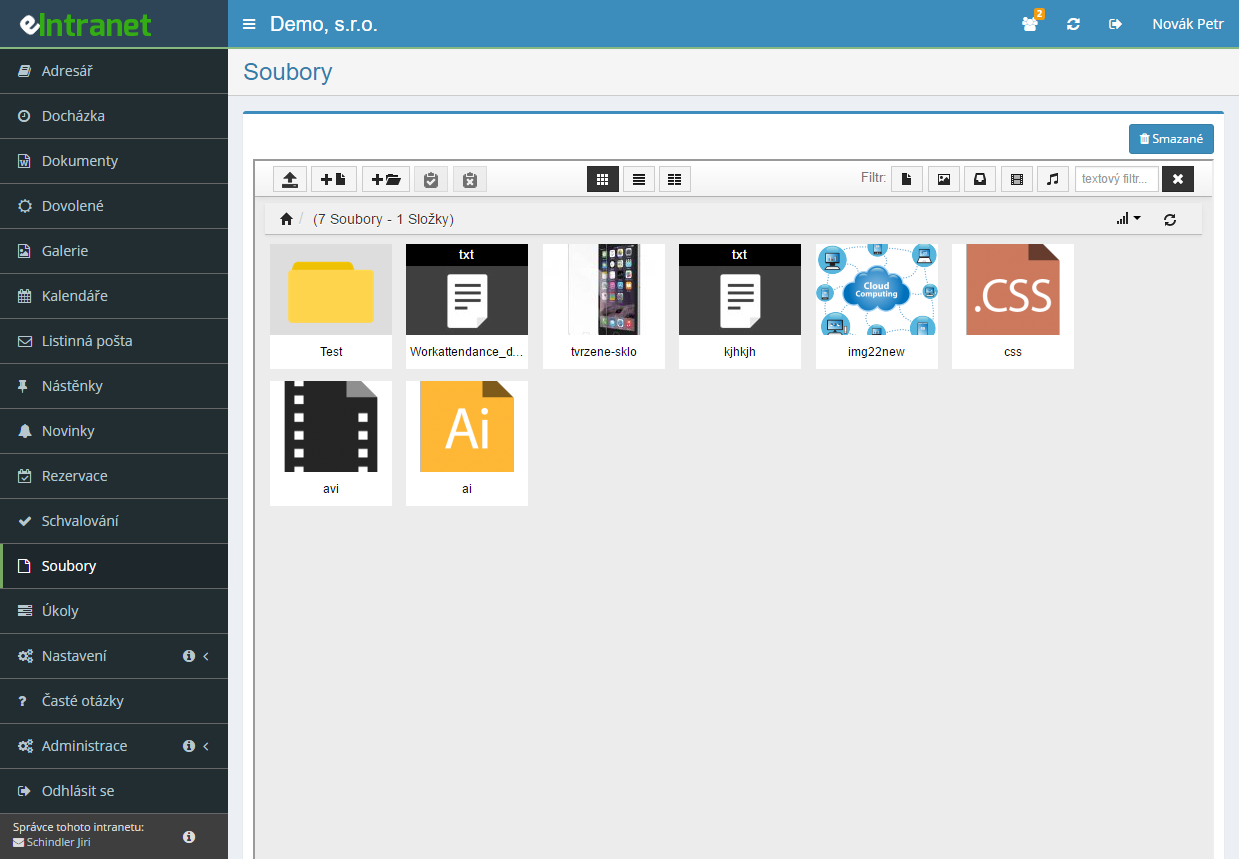
The files module is an internal storage space for various types of files, i.e. it serves as a repository for documents, audio recordings, videos, images and more.
Company file storage inside the intranet

A file manager with folders and subfolders that behaves much like FTP or a cloud drive, but without another login – it lives in the environment people already work in.

Upload by dragging or from a URL

Drag files into the marked area with the mouse, or pull them straight from a web address. ZIP archives can be unpacked into the current folder.

Preview a document without downloading it

PDF, Word and Excel open in the browser showing the first page. Images appear directly in the tile view.

A recycle bin with 100 days of protection

A deleted file stays in the bin for a hundred days and cannot be emptied sooner. Anything removed by mistake is always recoverable.

What you can use the files module for

  • Four permission levels

    No access, read, read and write, or full access including deletion and the bin. Granted to each employee separately.

  • Three display modes

    A list with Name, Type, Size and Date columns, a compact two-column listing, or tiles with image thumbnails.

  • Filter by type and by name

    A text box finds a file from part of its name; a filter narrows the listing to images, videos, music or archives.

  • Bulk actions on a selection

    Select all marks the whole folder and the files can then be deleted or downloaded in one go.

  • A direct link to a file

    On any file you can display its URL, which lets you point at the document from elsewhere.

  • Shared storage for attachments from other modules

    Attachments from the boards are stored here, in the Dashboard section, so an administrator has them in one place.

Sharing corporate documentation and files – your internal cloud for securely storing all types of files.

This module allows fast uploading, organizing, and sharing documents, audio and video recordings, or images in an intuitive FTP-like system. It simplifies daily communication between departments and ensures that every employee has instant access to the necessary materials without unnecessary searching.

  • Intuitive folder hierarchy – structure by projects or teams that facilitates quick search.
  • User rights and roles – set who can upload, edit, or only view files, thereby minimizing the risk of unauthorized access.
  • Document versioning – automatic saving of previous versions so you never lose track of change history.
  • Secure link sharing – generate one‑time or permanent links with a set time limit and password.
  • Integration API – connect files directly to CRM, accounting, or HR modules for automated data transfers.

Try the “Sharing corporate documentation and files” module and gain faster internal collaboration, reduced errors from manual copying, and increased data security. Join eIntranet.net today and simplify your work!

What company file storage is and what a business uses it for

Company file storage is one place holding the documents several people in the firm need – price lists, contract templates, photographs from jobs, manuals, supplier catalogues. Unlike a laptop drive, everybody else can reach them, and they do not vanish when a computer fails or an employee leaves.

The Files module in eIntranet is a built-in file manager with folders and subfolders. It behaves much like FTP or a cloud drive, but runs inside the intranet – nobody logs in again and nobody has to remember another password. Access is granted per employee at four levels.

Companies use the module mainly for two kinds of content. First, documents that change often and always have to be in the current version: the price list, forms, operating rules. Second, material that accumulates as work goes on and has to live somewhere: job photographs, technical sheets, scans.

Let us be plain about what the module is not. It is not a document version control system, it has no file locking against simultaneous editing and no approval process. It is storage – clear, reachable, and with a bin that holds deleted files for a hundred days.

How files get into the store and how they are shared out of it

The module needs no hardware. Files come in by three routes and three more lead out.

Uploaded from a computer

The basic route. In the toolbar you click Upload file and then either drag files into the marked area with the mouse or pick them with the Add file(s) button. Dragging sends several files at once. You start the upload with a button and return to the file list once it finishes.

Two limits people run into: the maximum size of a single file is 60 MB, and files with a disallowed extension cannot be uploaded. Executables such as .exe are refused, and deliberately so – shared storage anybody can drop a program into is a security problem.

From a web address

The upload dialog has a From url address tab. You paste a link to a file located on the internet and the system pulls it straight onto the server. It comes in handy with large supplier catalogues that would otherwise have to be downloaded and uploaded again.

By unpacking an archive

When somebody sends fifty photographs in one ZIP, there is no need to unpack it locally. Upload the archive, click it and choose Unpack here – the contents unpack into the current folder.

How files reach people

  • By download. Click the file name and choose Download. With a bulk selection using Select all, several files can be downloaded at once.
  • By preview in the browser. PDF, DOC, DOCX, XLS and XLSX show their first page as an image; images display directly. It saves downloading a document merely to find out what is in it.
  • By direct link. The Show URL address option prints the address of a specific file, which you can point at from a news item or an e-mail.

One technical detail about previews: for Microsoft Office documents the preview is generated using LibreOffice on the server. If a warning appears instead of a preview, that dependency is the reason – just download the file and open it locally.

Choosing company storage: what to ask

  • Can people without an office-suite account reach it? A shared drive on Microsoft 365 is out of reach for people on the shop floor. Storage in the intranet, where they go for their attendance, is not.
  • Can you limit who may delete? The commonest damage on a shared drive is not theft of data but somebody deleting a folder by mistake. Separating write permission from delete permission handles that.
  • How much space is included and what happens when it runs out? With cloud storage you pay extra for space. Here it is part of the subscription and tied to the number of users – details below.
  • Does a deleted file stay findable somewhere? And for how long? On this module, 100 days, and the bin cannot be emptied sooner, not even by an administrator.
  • Can you tell what is in a file without downloading it? With documents carrying unhelpful names, the preview decides whether somebody finds what they are looking for.
  • Do you need versioning and locking? If so, look elsewhere. This module is storage, not a document version control system.

Storage for a small business, for a plant and for a multi-site company

With files the value does not follow the number of documents but how many people need access, and from where. A company where everybody sits in one office with a network drive does not necessarily need this module.

An office of under ten usually treats it as a supplement: documents land here that people also need to reach from home or from a phone, without dealing with a VPN.

Production and warehousing are different. People there mostly have no Microsoft 365 or Google Workspace account, but they do go into the intranet for attendance and payslips. The Files module is the only place available to them where they will find an operating procedure or a technical sheet.

A multi-site company is dealing with reachability. A network drive at head office is useless for a shop in another town; storage in a browser works the same from anywhere.

What company storage costs and how much space you get

The Files module is not charged separately. You pay per user per month and the subscription covers every module except GPS location.

Number of users basic normal extra
1–102.4 €2.8 €3.2 €
11–202.1 €2.5 €2.9 €
21–501.7 €2.1 €2.5 €
51–1001.5 €1.9 €2.3 €
101 and more1.4 €1.8 €2.2 €

Prices per user per month, excluding VAT. The current pricing is on the Price list page.

On this module something else matters more than the per-user price: how much space the tier gives you. Space is counted per user and differs by tier:

Tier Space per user Ten users together
basic0.5 GB5 GB
normal2 GB20 GB
extra4 GB40 GB

That is a fundamental difference from the other modules, where the tier mainly decides the level of support. On files it is the main selection criterion instead. A company putting job photographs into storage, or scanning all its incoming post, will not fit into 0.5 GB per user – and it is better to work that out in advance than afterwards.

The question nearly everybody asks about storage: am I paying for volume or for people? For people – but the volume you get is derived from the number of people. Cloud storage usually bills the other way round, by the gigabyte regardless of account count. For a firm of five with a large volume of data a specialised cloud may therefore work out cheaper; for a firm of fifty with ordinary documents, eIntranet will, because space grows with every account.

One more figure worth knowing: the maximum size of a single file is 60 MB. A video from a job will not fit into the store; a presentation or a PDF catalogue will go in without trouble.

Free company storage: when the cloud is enough and where the limit sits

Let us say it plainly: if a company only needs to share documents and everybody has Google Workspace or Microsoft 365, a shared drive in those services is the better choice. It has versioning, simultaneous editing, a mobile app and more space. Adopting an intranet for storage alone makes no sense.

The limit shows up in four situations, and all four are quite concrete:

  • People without a licence. A warehouse worker, a driver or a temp usually has no office-suite account – and buying one just to reach the operating rules is not worth it. They do go into the intranet for their attendance.
  • Another password. The more places people have to log into, the fewer of them do. Storage inside the intranet needs no further login.
  • Attachments from other modules. Files from the boards are stored in this module's Dashboard section. An administrator has them in one place, which is impossible on an external drive.
  • A bin that cannot be emptied. A hundred days, and no way to clear it sooner – not even by an administrator. On a shared drive the bin usually has a shorter window and can be emptied at any time.

A network drive (NAS) in the office is a third option. It costs nothing extra per month and has plenty of space, but you cannot reach it from outside without a VPN and the backups are your problem.

If you are unsure, eIntranet can be tried free for 14 days, storage included.

How to roll storage out

  1. Think the folder structure through before uploading the first file. Splitting by department or by year works; splitting by people's names does not. A folder can be renamed at any time, but rearranging established storage is real work.
  2. Grant rights by role, not across the board. Read is enough for most people; write is needed by whoever prepares the documents. Give delete to one or two people – removing a folder removes everything in it.
  3. Do the storage arithmetic. Multiply the number of users by the tier's quota and compare with how much data you want to upload. With job photographs the result tends to surprise.
  4. Upload what people actually look for. Storage stuffed with ten years of archives goes unused. Start with the current versions.
  5. Agree on file naming. It sounds trivial, but the text filter searches by name – a file called "document1.pdf" will never be found by anyone.
  6. Tell people about the bin. A hundred days is a long time and a lot of panic over a deleted file is unnecessary. Restoring is not automatic, though: the file has to be downloaded from the bin and uploaded back to the right place.

What to read next

  • Boards – attachments from posts and comments are stored right here, in the Dashboard section.
  • Paper Mail – for scanned documents tied to a specific item, which belong with the mail record rather than in general storage.
  • News – adding a new document can automatically create an announcement linking to it.
  • Contracts – for documents whose deadlines and validity have to be watched, not merely stored.

Frequently asked questions

A maximum of 20 files can be uploaded at a time, with a capacity not exceeding 60 MB. Files can be uploaded repeatedly. The total size of all stored files within the eIntranet depends on your prepaid plan.

A maximum of 60 MB per file. Anything larger has to be compressed or split into smaller parts before uploading.

The extension is restricted too: files with a disallowed extension, such as executable .exe files, are refused by the file manager for security reasons. If you need to upload a file with an unusual extension, ask an administrator.

Space is counted per user and depends on the tier: 0.5 GB per user on basic, 2 GB on normal and 4 GB on extra. Ten users on the normal tier therefore have 20 GB between them.

It is the only module where the tier mainly decides capacity rather than support. A company putting job photographs into storage should do the arithmetic in advance.

Deleted files stay in the bin for 100 days. Click the Deleted button in the module header, find the file, download it and upload it back into the right folder.

Direct restoration to the original location is not available – recovery always goes through download and re-upload. The bin also cannot be emptied sooner than a hundred days, not even by an administrator.

Your permission is only at the Read level, which allows browsing folders and downloading files. Uploading requires the Read, write level or higher.

Rights are set under Settings → Files for each employee separately; the columns run from the lowest permission to the highest, left to right.

Preview generation for DOC, DOCX, XLS and XLSX depends on LibreOffice installed on the server. If it is unavailable, the system shows a warning instead of the preview.

The fix is simple: download the file and open it locally. For PDFs and images the preview works independently of that component.

Yes. In the upload dialog switch to the From url address tab, paste the link to the file and confirm. The system pulls it straight onto the server without you having to hold a copy.

It is handy with large supplier catalogues. ZIP archives can also be unpacked into the current folder after upload with the Unpack here option.

You have no permission on the module. It only shows in the menu for a user at the Read level or above; with No access set, they do not see it at all.

Ask an administrator to grant access under Settings → Files. There are four levels: no access, read, read and write, and full access including deletion and the bin.

No. The Files module is storage – it has no version control, no file locking against simultaneous editing and no approval process. Uploading a file under the same name replaces the previous version.

If you need versioning and simultaneous editing, tools such as Google Workspace or Microsoft 365 suit that better. For sharing documents with people who have no licence in those services, this module suits better.

Registration is non-binding and includes a free 14-day trial of the application.

Try it free Pricing