

 Slovak
 Hungarian
 Polish
 German
 Spanish
Received orders
Keep customer orders firmly under control
 Help
Help
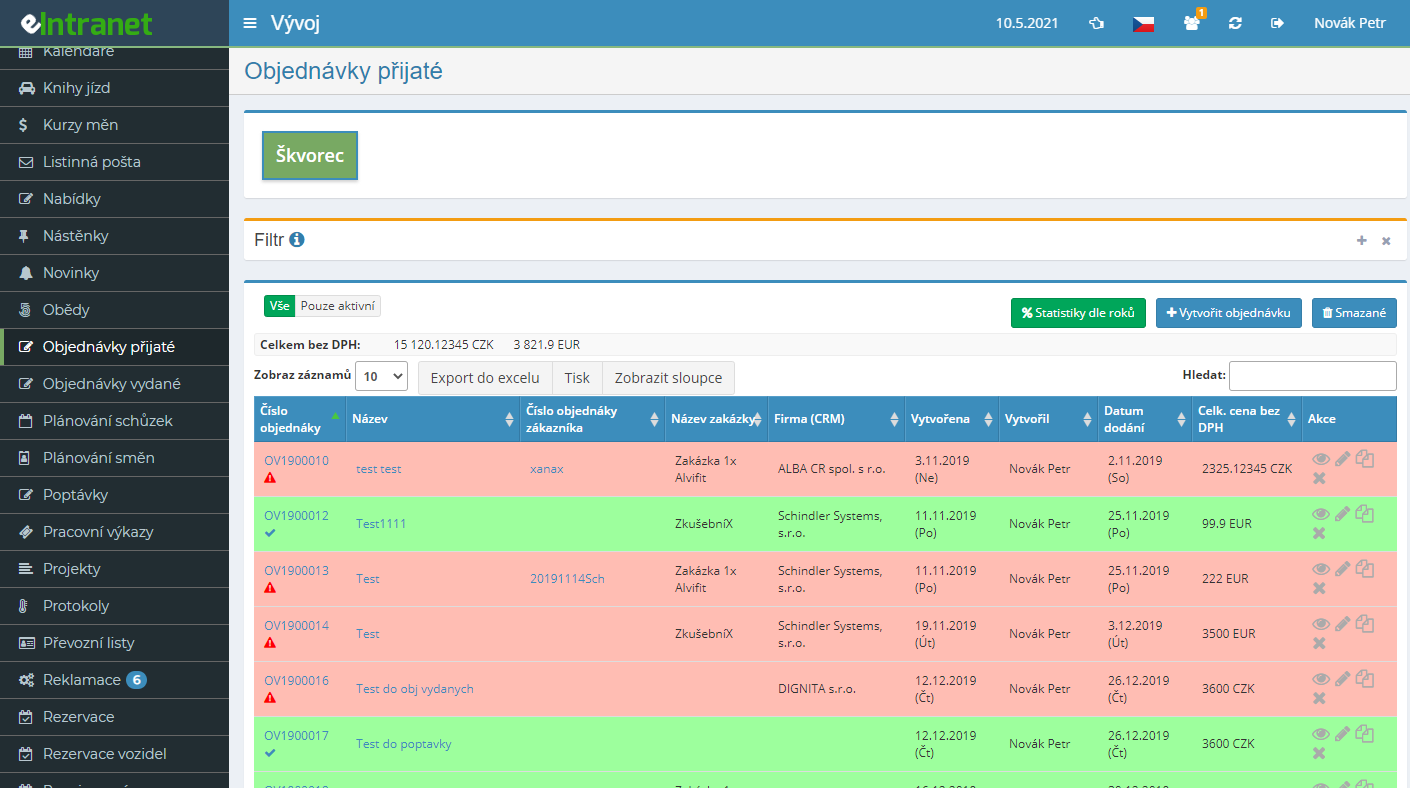
Keep every order received from your buyers in one place. Link each order to a company in CRM, add a contact person, currency and the requested delivery date, and you always know exactly what your customers have ordered.
Add free-text rows, catalogue products, stock items, or pull in entire quotes. Prices, discounts and VAT recalculate on their own. Need a 10% increase across the board? One bulk edit handles it.
Each line shows how many units have already shipped. Fully completed orders stand out in colour, overdue items flag a red icon. Nothing slips through.
Generate an order confirmation in seven languages and your preferred paper size. Check the preview before printing and send the finished PDF to the customer straight from the system.
Publish a form that needs no login. The customer picks goods in stock, enters quantities and contact details, and the order is created automatically. All you do is pick it up for processing.
What you can use the orders received module for
-
Order groups for branches and divisions
Split the agenda into groups by branch or division, each with its own supplier details, logo and separate user permissions.
-
Automatic numbering in your own format
Set the prefix, year format, suffix and number of digits. Every new order gets a number that matches your conventions exactly.
-
Delivery notes and invoices from an order
Turn a received order into a delivery note or an invoice with a single click. Items carry over, stock is written off and the count of undelivered units drops.
-
Links to quotes, contracts and products
Create an order straight from a quote, attach it to a contract, or pull products from the catalogue together with their price and code.
-
Filter by company, date and author
Find orders by creation or delivery period, CRM company, the person who created them or by year. The "Active only" button shows just the open ones.
-
Internal notes on every order
Track communication about fulfilment right on the order. Notes with a date, author and attachments keep the whole context together.
-
Yearly statistics and Excel export
Review the count and value of orders across individual years. Export the table to Excel whenever you need deeper analysis.
Connections with other modules
Orders received sit at the crossroads of sales, warehouse and invoicing. Data moves between modules without retyping.
Received Orders – a central module for electronic record-keeping and management of orders from corporate customers. With this tool you gain full control over the entire cycle: from entry through approval to invoicing, all within one integrated ERP environment.
- Simplified Record-Keeping – all orders are stored in a single location, minimizing the risk of data loss and duplication. Access to history is quick even for audit purposes.
- Electronic Customer Entry – customers can add an order directly into the system via a web form, reducing response time by 30 % and eliminating manual input.
- Automatic Alerts – with every new entry or status change you receive an email or notification, so no order slips through the cracks.
- Integration with Other Modules – order data automatically syncs with CRM, inventory, and accounting modules, saving time on manual transfers and reducing errors by up to 25 %.
- Flexible Reporting – generate reports by date, customer or order value and gain insights for business planning.
Try the Received Orders module and speed up order handling, reduce administrative costs and increase your corporate clients’ satisfaction. Contact us for a demo or live test!