
Attendance
How to keep attendance under control all year round


 Help
Help
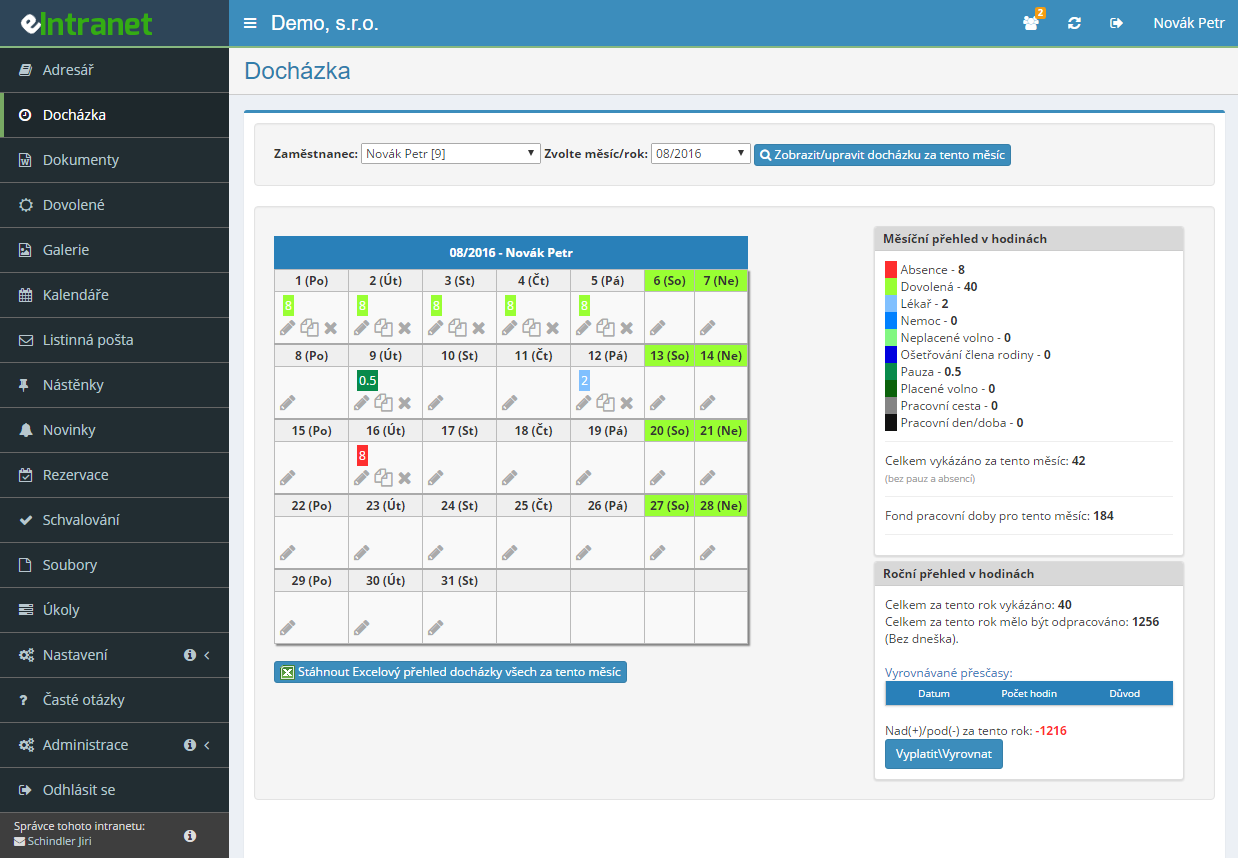
Record attendance to the minute and let the calendar colour-code working hours across 21 types – a regular shift, a doctor's visit, home office or on-call duty.
The employee signs off the month, the manager closes it and the period locks. How many days back anyone may still edit is set separately before and after approval.
The gap between contracted and worked hours runs continuously. You define your own meal voucher rules and an unused lunch break is deducted automatically.
PAMICA and Money S3 receive XML, VEMA PAM F90 gets a CSV file. Before you send anything, download the check report and verify the figures.
What you can use the attendance module for
-
Pre-filled working hours from a template
Enter times and weekdays, a nightly job does the rest. Only days with no record get filled in.
-
Clock in from a phone, a chip or a fingerprint
The phone records a mandatory GPS position, a Raspberry Pi terminal reads an RFID/NFC chip or a fingerprint.
-
Sick leave and holidays post themselves
An approved request from the Holidays module and an incoming electronic sick note land on the right days.
-
Shift rosters prepared in advance
Build the attendance plan weeks ahead and turn it into actual attendance with a single button once the shifts are worked.
-
Timesheets for the labour inspectorate
Download the report in the required layout as an Excel file, with a separate sheet for every employee.
The Electronic Timekeeping (EED) is a key module of eIntranet.net that enables corporate teams to easily track and manage working hours, vacation or sick leave without paper. It provides a quick overview of all employee events and automates routine tasks.
- Simple tracking: Employees can confirm work time, business travel, or illness directly from mobile devices or the web.
- Supervisor approval: A clear interface for rapid attendance approval with the option to add notes.
- Overtime and meal voucher claims: Automatic calculations that save both administrative and accounting effort.
- Automatic recording of sick leave and vacation: The system automatically processes medical certificates or approved vacations without manual intervention.
- Export to Excel: Export data as needed – ideal for accounting, HR, or internal audit.
With EED you get a faster approval process, reduced errors in record keeping and a clear overview of labor cost. Add the module to your ERP system today and simplify human resources management.
Frequently asked questions
Yes. The administrator of your eIntranet can enter working hours in the module settings that will then be filled in automatically. The pre-set working hours are written to the given employee for that calendar day shortly after midnight.
Different working hours can also be pre-set for individual days of the week.
Yes. In the module settings you need to tick "Attendance confirmation by employee". After that, a button for confirming the attendance for the given month appears below the employee’s attendance table.
Yes. If a holiday is approved for an employee in the Vacations module, the information is written into their attendance automatically.
The same applies to sick leave: if the E-Sick Note module is active in your eIntranet (it works through the Data Box module), the information is written into the employee’s attendance the moment the data message about incapacity for work is received.
Yes. The conditions for earning meal vouchers can be entered in the module settings. The entitlement is then calculated according to those parameters both in the attendance view and in the exports.
Yes. A user who has been granted approval rights in the module settings can approve the recorded attendance of the relevant employees.
The approval option for the selected employee sits at the bottom of the module’s main page. Once a user approves attendance up to a given date, the attendance for that period is locked and can no longer be changed retroactively.
Yes, attendance can also be recorded using chips. If you are interested in this option, please contact us. Chips are available as a sticker or a plastic card – the price is CZK 50 excl. VAT per piece. A reading device is also required (a mobile phone or tablet with an NFC chip reader).
Yes. In the Attendance module you can download a file for export to the PAMICA payroll program. The exact shape of the file (how overtime, public holidays and similar items are written) is configured in Settings → Attendance → General settings → PAMICA export section.
Yes. Switch on the mobile clock-in option in the attendance settings and employees can clock in straight from their phone. Every entry mandatorily stores the GPS location – without location permission the record is not created.
Town, street and a map link are added in the background and appear in the attendance detail. The place is shown only for an open arrival, not for a departure.
The administrator decides in the module settings – they set the number of days for retroactive editing and, separately, how many days it stays editable after supervisor approval. Once that window closes, the pencil icon on the day turns into an eye icon and the record becomes read-only.
A company can also switch on a change log, so every intervention keeps a record of who made it and when.
Yes. Once the Work plan function is enabled, an Attendance plan tab appears next to attendance, where a supervisor builds the rota in advance. A day can be copied to further days and to further employees at once.
After people have worked according to the plan, it is transferred into real attendance by the Convert plan to attendance function for a chosen period. The plan can also be exported to Excel as a work sheet.
Yes. In the report download section you will find an employee work sheet in the layout used for labour inspection, in Excel format. Every employee gets their own workbook tab with daily records, from–to times, working-time types and totals.
A variant based on the attendance plan and a combination of plan and reality are available too. A single employee’s work sheet can also be downloaded as a PDF.
Yes. In the dialog for that day, the Add row button inserts another record, so you can enter morning work alongside afternoon holiday or a doctor’s appointment. How many rows a day may hold is set by the administrator.
If the company has the Holiday only from the Vacations module option switched on, the Holiday type appears in the day only after the request has been approved in the Vacations module.
Yes, there is a "Used types" section in the attendance module settings. Here you can choose the types of attendance (working day/time, vacation, non-/paid leave, illness, etc.) and the color of their attendance entry as needed.
Yes, in the attendance module settings, you can set the pause to be automatically deducted (for all users/selected users) and the minimum length of time worked after which the pause should be recorded.
Registration is non-binding and includes a free 14-day trial of the application.