System for assigning and tracking tasks

Tasks

Keep tasks and deadlines firmly in hand

Clear assignment, plain statuses and automatic alerts keep your teams in the loop. Nothing gets lost, deadlines hold, and everyone knows what they own.

Try it free Pricing

Available in languages: CZ EN DE HU PL SK ES Help
What you can use the tasks module for
The tasks module is used to clearly manage and assign tasks to employees and external collaborators, or to all users who have access rights to the module. The rights of individual users are simply defined by the application administrator, and then it is possible to assign the necessary tasks to them.
Assign and complete tasks in one place

The Tasks module covers the whole journey from assignment to completion. Add solvers, a lead solver and an approver, set a deadline, and watch each task status change in real time.

Three views: list, Kanban and calendar

Switch as the moment calls for it. The table gives you detail and exports, the Kanban board lets you drag cards between statuses, and the calendar lines tasks up by deadline. Everyone arranges their Kanban cards their own way.

Email and SMS alerts

Solvers hear about a new task right away. Send a reminder once, or repeat it every day until the work is done – by email, by SMS, or both.

Recurring tasks without re-entering

Set up routine work once. The task renews itself weekly, on a chosen day of the month, or in selected months of the year. Nothing slips through.

Statuses, priorities and custom fields your way

Colour-coded statuses, five priority levels and up to eleven optional fields (text, number, date, dropdown, CRM company) shape the module to match how your firm actually works.

What you can use the tasks module for

  • Bulk assignment to several people

    Hand out the same work with a single form. Each employee gets their own task to track separately.

  • Notes, discussion and attachments

    Add notes to any task, hold a discussion beneath them and attach files. Everything stays together in a chronological history of changes.

  • Approval of completion

    The Resolved status can be reserved for the approver alone. Mandatory closing fields make sure the solver records the outcome before wrapping the task up.

  • Quick select and filters

    One click shows today's tasks, your open items, or anything past its deadline. The detailed filter searches by status, priority, solver and even custom field values.

  • Granular permissions

    Decide who may read tasks, who can create them and who can change statuses – set it per user and per group.

  • Excel export and printing

    Export the current selection to Excel or print it. The export honours your active filters, so you get exactly what you asked for.

Electronic task entry and tracking is a key tool for streamlining internal processes in small and medium-sized businesses. It allows you to quickly assign tasks to both employees and external collaborators and monitor their status in real time.

  • Clear governance – set individual user permissions so each person sees only what they need.
  • Flexible states and priorities – tailor the workflow to your organization’s specifications and quickly identify critical tasks.
  • Automatic notifications – email, SMS or calendar reminders ensure no deadline slips through the cracks.
  • Recurring tasks and optional fields – easily configure a regular workflow and add specific information as needed.
  • Calendar integration – all entered tasks automatically sync, so planning is always up to date.

Use this module to reduce administrative burden by 30 % and improve deadline compliance. Try it today and see how quickly you can turn scattered tasks into clearly defined steps for growing your business.

What the Tasks module is and what a company uses it for

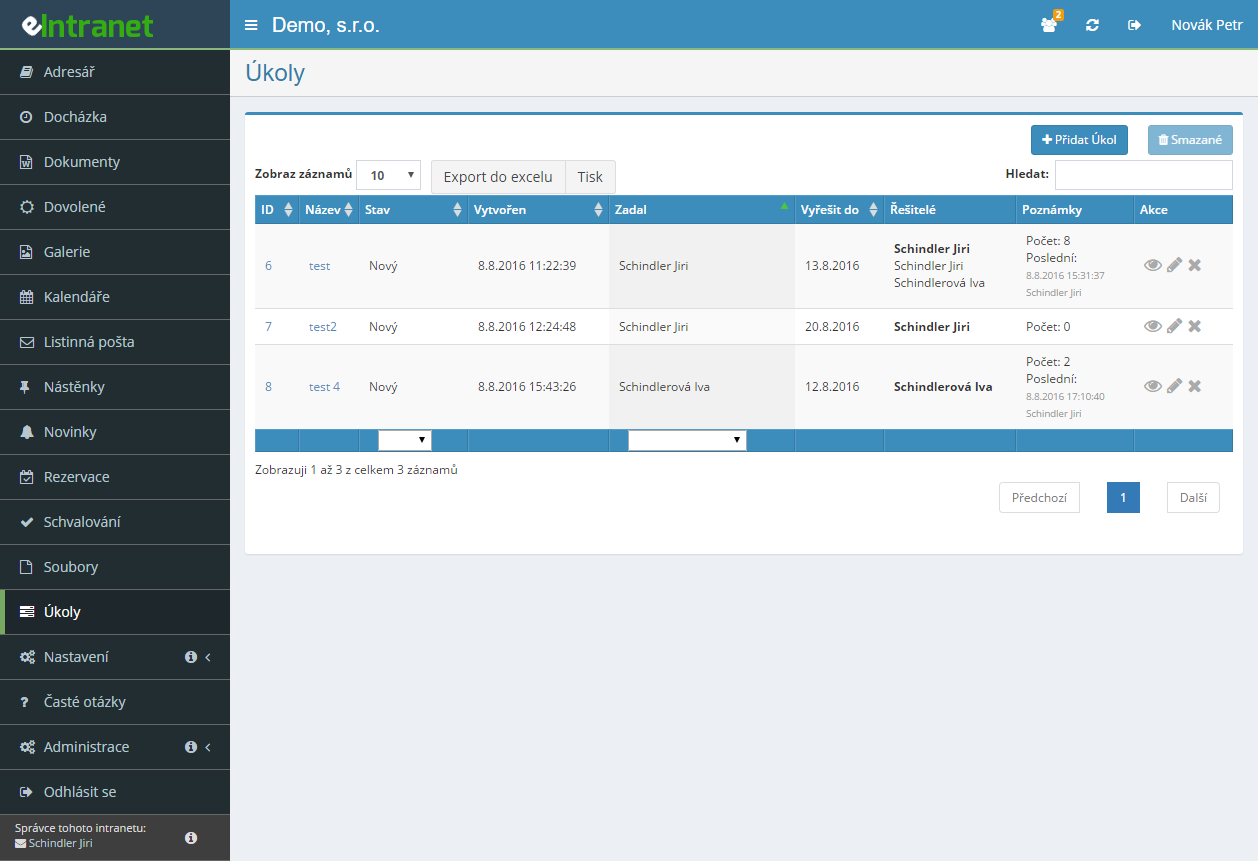
The Tasks module is a record of work assignments with four roles: the person who assigns, the main assignee, additional assignees and an approver. Every task carries a status, a due date, a description, notes and attachments. Tasks appear as a list, a Kanban board, a calendar or a personal production queue, and notifications go out by e-mail and by SMS.

There is no single typical use, because every company sets up its own statuses, priorities and optional fields. Construction firms run tasks by contract, service teams keep requests linked to helpdesk tickets, back offices handle recurring paperwork with repetition rules, and workshops use it as a work queue per operator. Same database, different configuration.

What separates it from a list in an inbox or on paper is traceability. Every task keeps who created it, when the status changed, who added a note and what they attached. The Notes/Changes tab holds the whole history in chronological order, so nobody has to reconstruct a month later how the task actually developed.

How a task moves from assignment to approved completion

The module does not force one single workflow, but a typical task travels like this:

  1. Assignment. The Add task button opens a form for the name, the initial status, the main assignee, optionally an approver and further assignees, the Solve by date, priority, description, optional fields and attachments. If contract entry is switched on in the settings, the task is attached to a contract or directly to a part of a project.
  2. Notification. After saving, assignees and the approver get a message by e-mail or SMS if the relevant option is enabled. Independently of that, each task can carry a reminder: once at a given date and time, or every day at a set time until the task is done.
  3. Working on it. The assignee changes the status, adds notes and attachments, and a discussion can run underneath the notes. The status can be changed in the detail view, in the list, or by dragging the card between Kanban columns.
  4. The check before closing. Optional fields flagged as required on completion have to be filled in, otherwise the system refuses the Solved status and shows which field is missing.
  5. Approving completion. If only the approver may set the task as solved, the assignee cannot close it. This restriction can be switched on globally or only for selected tasks.
  6. Locking. With the Lock solved tasks option, nobody touches a closed task any more, so it stays exactly as it was approved.

Overdue tasks have nowhere to hide. The Quick selection panel has an Overdue unfinished button that turns red whenever such tasks exist, and next to it Today, My today and My unfinished, each with a count in brackets.

Where tasks come from: bulk assignment, repetition, asset inspections and helpdesk tickets

Manual entry is only one route. Bulk assignment turns a single form into a separate task for every selected worker, so the same job goes to ten people and each of them handles their own copy. Copying opens a new task pre-filled from an existing one. In the calendar view a click on an empty day opens the form with the date already set.

Recurring tasks are created by the system itself. You set weekly repetition with chosen weekdays, monthly on the first given weekday of the month, monthly on a specific day number, or in selected months of the year. A regular inspection, invoicing run or check then shows up in the list without anyone having to remember it.

Some tasks arrive automatically from other modules. The Asset register can create a task automatically a set number of days before the next inspection date of any inspection type, so an approaching technical check appears as a task with an assignee. From the HelpDesk module a specific ticket can be attached to a task, and the task detail then shows the helpdesk project name, the ticket subject and the requester's e-mail with a link straight to the ticket.

The module needs no device. There is no terminal, reader or mobile hardware to buy. The only external dependency is SMS notification, which requires an active SMS gateway; e-mail notifications, reminders and escalation of unfinished tasks work with nothing extra.

On the way out, the due date goes into the Calendars module as an event, with separate colours for open and for solved tasks. Time spent is recorded on the Work reports on this task tab, so it is visible how much work a task actually took. The current selection of tasks can be exported to Excel or printed, and the export respects the filters and visible columns you have set.

How to choose task management software: four questions that decide it

There are dozens of task tools and at first glance they differ only in looks. These are the questions worth asking.

1. Does the tool adapt to your statuses, or do you adapt to its? A company whose workflow is "Assigned – In progress – Waiting for customer – Solved" needs exactly those four, colours included. In eIntranet statuses are switched on and coloured in the module settings; note, though, that with no active status the module reports a warning and does not work, so it is the first thing to configure.

2. Can the tool force an assignee to fill something in before closing? This is the difference between a wish list and a record. Optional fields can be marked as required on entry or required on completion, and without them the task will not close. That is how companies enforce a result description, a part number or an inspection date.

3. Who may change a status and who may edit the task? Ask whether the tool distinguishes the two. Without it, anyone can push someone else's task into Solved. eIntranet has three separate options for this: anyone may change the status, only the creator may edit, and only the approver may mark it solved.

4. Does it connect to whatever the task belongs to? A task rarely stands alone. It usually sits with a contract, with a part of a project, with a customer ticket, and at the end with a work report that has to be invoiced. A tool that makes you retype that link into another system will end up adding work rather than saving it.

Everything the Tasks module can do

Views and orientation

  • List – a table with the columns ID, Name, Status, Created, Created by, Solve by, Priority, Assignees, Main assignee, Approver, Notes, plus optional fields as further columns. Columns can be hidden.
  • Kanban – columns by status, cards dragged between them, and card order remembered separately for every user.
  • Calendar – month, week and day, with a tooltip on hover and a due date changed by dragging the task to another day.
  • Production queue – a personal work queue split into a Pinned by the assigner block, which the worker cannot reorder, and My order, where they arrange the rest themselves.
  • Quick selection – All, Today, My today, My unfinished, Overdue unfinished, plus buttons by status and priority with counts.

Configuration to fit the company

  • Custom statuses with background and text colour, and five priorities with your own names; an empty name switches a priority off.
  • Up to eleven optional fields of type yes/no, integer, decimal number, date, company from CRM, list, single-line and multi-line text.
  • Six permission levels from Read own and be assigned up to Read, edit and delete everything. They are set for users and for groups, and when both apply the higher value wins.
  • Behaviour options – time alongside the due date, contract and project columns in the table, locking of solved tasks, how many tasks and notes appear on the home screen, discussion under notes, or the option to delete notes (the main assignee any time, everyone else within 15 minutes of writing).

Filtering, searching and bulk operations

  • A detailed filter by name, contract, creation date, status, priority, assignee, main assignee, approver, creator and even by the values of optional fields. An active filter is highlighted in red in the panel header.
  • Instant text search above the table, a Created in the last 1, 3, 6 or 12 months filter, and a filter by year. If a company has more than 200 tasks, the system limits the selection to the current year by itself so that the table does not take too long to load.
  • Bulk deletion of the displayed tasks, restoring from deleted items, and export or printing of the current selection.

Task management for free: when Trello or Todoist is enough

Let us be straight about it. Trello, Todoist, Microsoft To Do and a shared document are all good at tracking tasks, and their free versions are usually enough. If you need three columns, a handful of cards and nobody checks who closed what, there is no point paying for anything and the Tasks module will not bring you much.

The boundary lies elsewhere and it is fairly easy to recognise. The first part is connection: the moment time spent on a task has to feed work reports and then the invoicing of a contract, a standalone tool stops being a saving, because somebody retypes the same data a second time. The second is enforcing a procedure: free tools cannot block the closing of a task until the assignee fills in the result, and they cannot separate who may change a status from who may change the content. The third is recurring work tied to another record, for example asset inspections that are supposed to appear as tasks on their own.

The first 14 days of running eIntranet are free to try, so you can also confirm that what you have already is enough.

Tasks in the office, in production and in service

In an office the module is used in its simplest form: a list, three statuses, priorities and due dates. What helps most here is repetition, because most administrative work is regular, and notes with attachments, which keep the supporting documents with each task.

Production works with the production queue. The foreman pins what has to be done in a given order (the Pinned by the assigner block) and the worker arranges the rest themselves. A task can carry a serial number, so it is clear afterwards which piece the work belonged to.

Service desks run the chain from a customer ticket to an internal task. The ticket is attached to the task, the technician sees the subject and the requester's contact in the detail view, and time spent is recorded right there. Kanban is usually the main view here, because a "waiting for customer" status is visible at a glance.

External collaborators are assigned tasks in exactly the same way as employees. They do need an account in the application, though, because a task cannot be assigned without one, and their permission level is usually set to Read own and be assigned so that they do not see the whole company's workload.

What the Tasks module costs

You pay for user accounts, not for the number of tasks, notes or reminders. The module does not cap the number of tasks, and that is a real difference from tools that charge per project or per card.

What drives the price is how many people are to receive tasks. External collaborators count too, because being an assignee without an account is not possible. An office with six employees and three contractors therefore has nine accounts, falls into the 1 to 10 user band, and pays 2.4 EUR per user and month excluding VAT in the basic tariff, that is 21.6 EUR a month. At twenty users the price is 2.1 EUR and above a hundred users 1.4 EUR per user.

The second thing worth calculating for this module is storage. Files are attached to tasks and notes, and if technicians send photographs from the field, a few hundred megabytes a month add up easily. The basic tariff gives 0.5 GB per user, normal 2 GB and extra 4 GB. For a team that uses attachments routinely, the normal tariff is a more sensible choice than buying extra space later. SMS notifications require an SMS gateway arranged separately; e-mail notifications are included. Telephone technical support belongs only to the extra tariff, and the number of phone queries per year is capped at the number of prepaid users. Every module is included in every tariff, so Tasks costs no extra. Current prices are in the price list.

How to set the Tasks module up so that people actually use it

The settings are under Settings → Tasks, and this order works best.

  1. Statuses. In the used task statuses section switch on the ones that match your workflow. Without an active status the module does not work and shows a warning. Stick to four or five statuses; a longer row stops fitting on the Kanban screen.
  2. Priorities. Rename them to suit you, or switch them off with an empty name. Nobody keeps five priorities apart in practice; three usually do.
  3. Optional fields. Add them only as real needs appear, and decide right away which field is required on entry and which on completion. It is the second option that turns tasks into a usable record.
  4. Permissions. Set them by group and handle only the exceptions per user. Contractors are usually fine with Read own and be assigned.
  5. Notifications and calendar. Switch on e-mail notifications and choose the calendar the due date should be written into, including the colours for open and solved tasks.
  6. Home screen. Set how many recent tasks and notes appear on the dashboard. This decides whether people notice their tasks without opening the module at all.

Do not roll everything out at once. Statuses, permissions and e-mail notifications are enough for the first month; add repetition, optional fields and the production queue once it is clear what daily practice really lacks.

What to read next

Task due dates are written into the Calendars module, where they meet meetings, leave and room bookings. Time spent on a specific task is recorded in Work reports, and from there it feeds the basis for invoicing the contract.

Frequently asked questions

Yes. In the Tasks module settings you choose which calendar (if you use more than one) the created tasks should be written into. The colour of the event can be set separately for open and for solved tasks.

The Tasks module does not work without an active status – no task can be created or displayed. Go to Settings → Tasks, tick at least one status in the used task statuses section and save.

Every status has its own background and text colour, so you also decide there how tasks will look in the table and on the Kanban board.

There are three reasons. Either you are not the main assignee and do not have the highest permission in the module, or optional fields marked as required on completion are not filled in (the system lists which are missing), or the option that only the approver may mark a task as solved is switched on.

That last restriction can be enabled globally for the whole module or individually for each task.

Use bulk task creation. You fill in the form as for a normal task, but select several users in the Main assignee field. The system then creates a separate task for each of them, which each person tracks and closes on their own.

So it is not one shared task with ten assignees, but ten tasks with the same content.

Yes. On the task you tick the repeat option and choose the type: weekly with selected weekdays, monthly on the first given weekday of the month, monthly on a specific day number, or in selected months of the year. The system then creates the task on its own.

Repetition can be switched off at any time with the cancel repetition button in the task detail.

You set the reminder in the task detail. You choose the channel (e-mail, SMS or both), the recipients (main assignee, other assignees, all assignees, or all assignees and the approver) and the timing: once at a given date and time, or every day at a set time until the task is completed.

Daily reminders stop automatically as soon as the task is solved.

It depends on the configuration. Without the option that anyone may change a task status, only a user with the highest permission, the main assignee or the approver can do it. Editing the other fields can additionally be limited to the task creator, and solved tasks can be locked entirely.

On the Kanban board this shows up as a card that snaps back after being dragged, if the user has no right to change the status.

There are up to eleven optional fields for additional data specific to your company. Every field has a name and a type: yes/no, integer, decimal number, date, company from CRM, list, single-line or multi-line text.

For each field you also decide whether it is required on entry, required on completion and whether it appears as a column in the main table. Tasks can be filtered by their values as well.

Yes, in three ways. Contracts are enabled in the module settings (optionally restricted to the list from the Contracts module), a task can be attached to a part of a project in the Projects module, and a specific HelpDesk ticket can be linked from the task detail.

For a linked ticket the task shows the helpdesk project name, the ticket subject and the requester's e-mail with a link straight to the ticket.

Usually it is the number of displayed tasks. Use the Filter panel or Quick selection and pick a specific year instead of All in the year field. If a company has more than 200 tasks, the system sets the current-year filter by itself.

Hiding unused table columns helps as well, because optional fields can be displayed as extra columns.

The production queue is one worker's personal work queue. It has two parts: the Pinned by the assigner block holds the order set by whoever assigned the work and the worker does not move it, while in My order they arrange the remaining tasks themselves.

Kanban, by contrast, shows the whole team's tasks by status. The order of Kanban cards is remembered separately for each user.

Registration is non-binding and includes a free 14-day trial of the application.

Try it free Pricing