
Reservation
The end of the note taped to the meeting room door


 Help
Help
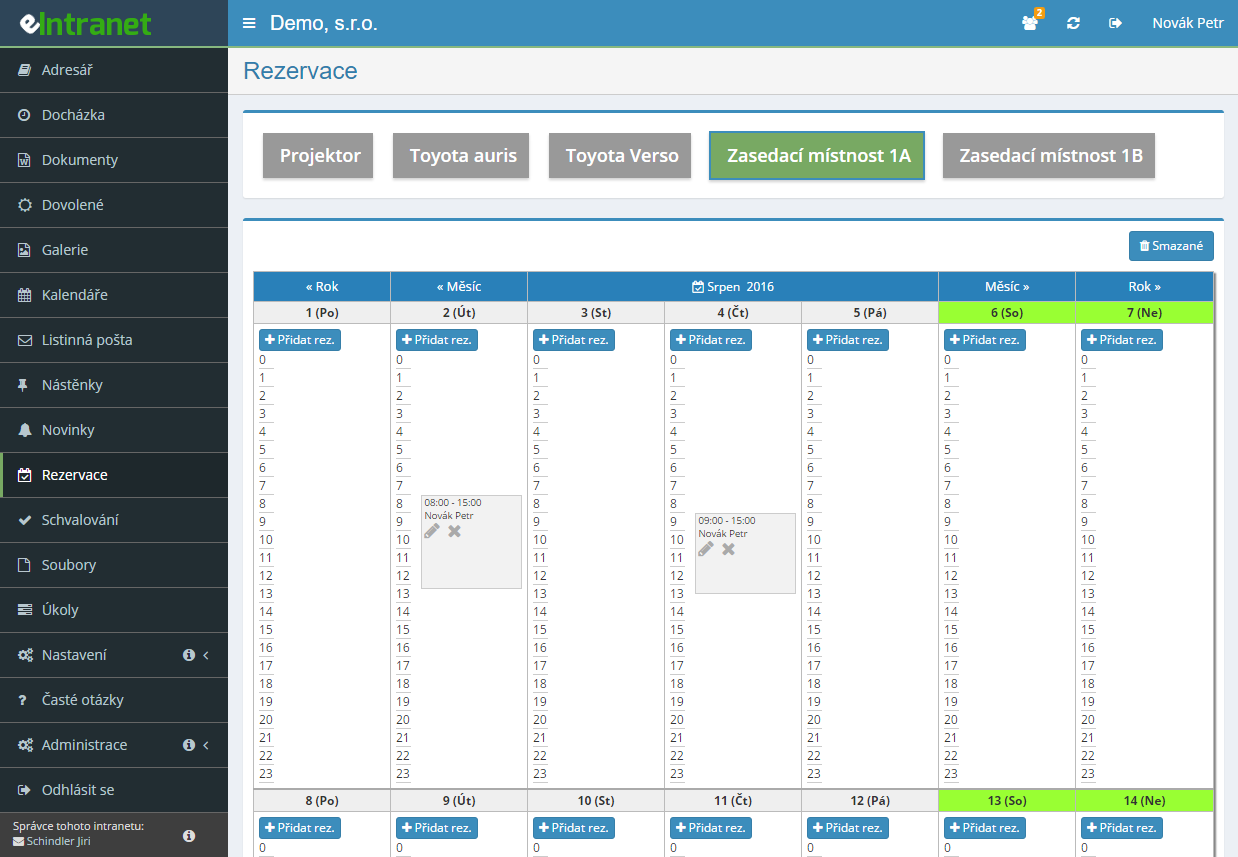
Every bookable object has its own capacity, permitted hours and access rights. Meeting room, van and projector are all managed in one place.
Overlaps are checked as you type the date and time – the warning appears before you get anywhere near the Save button.
One view shows how busy every meeting room and vehicle is, each object in its own colour. It is read-only – booking happens in the object's own calendar.
Tick Monday and Wednesday, set an end date and the system builds the whole series. Cancelling it is equally quick with the Delete series button.
What you can use the booking module for
-
Book by dragging in the weekly view
Mark a stretch of the timeline and the form fills in with the exact from and to times. Times are picked in five-minute steps.
-
Three separate permissions on every object
Who may see, who may book and who may cancel other people's bookings. The last one suits reception or a fleet manager.
-
Object groups under one tab
A parent name gathers vehicles under Fleet and rooms under Meeting rooms. With dozens of objects it is a necessity.
-
E-mail alert on a booking
On each object you name who gets a message when a booking is created or changed – with the name, the slot and the note.
-
Booking detail on hover
The tooltip shows the note, the slot, the object name and who made the booking. No need to open the form.
-
Booking list with Excel export
Switch from calendar to table, search, sort and download the XLSX or send it to the printer.
Electronic Reservation – Intelligent Corporate Asset Management
The Electronic Reservation module simplifies the sharing and scheduling of corporate assets—from vehicles to meeting rooms to technical equipment. A clear calendar for each resource instantly shows availability, eliminating conflicts and saving time.
- Easy Item Management – quickly add vehicles, rooms, or devices to the system with configurable properties.
- User Permission Differentiation – define who can reserve a specific asset and when, minimizing unauthorized access.
- Automatic Notifications – email or SMS reminders for both reservers and asset owners reduce missed deadlines by up to 30 %.
- Export and Reports – CSV/Excel export of calendars and resource usage enables consumption analytics and budget planning.
- Integration Options – APIs for connecting with eIntranet.net CRM, HR, or ERP modules so data runs synchronously across the entire company.
With the modular Electronic Reservation you’ll achieve faster scheduling, fewer conflicts, and better control over corporate assets. Try it today and save up to 20 % of time on daily resource management.
Frequently asked questions
You have not been granted access rights to any object. A tab appears only to somebody holding at least one of the three permissions: May see bookings, May book, or May cancel anybody's bookings.
The fix is on the administrator's side: under Settings → Reservation they add you to the relevant column on that object with the Select users button.
Only with the May cancel anybody's bookings permission. A user with May book can edit and delete their own bookings and nothing else.
The permission is set under Settings → Reservation on each object separately. It makes sense for a vehicle fleet and lent-out equipment, where slots change often; on meeting rooms it is usually unnecessary.
Another booking of the same object exists at that time. The overlap check runs while you enter the date and time, so the warning appears before you save.
Look at the calendar to see when the object is free and pick another slot. If somebody else's booking caused the clash and it needs cancelling, ask a user with the May cancel anybody's bookings right.
No. Recurrence can be set only when creating a new booking. If you need a series after the fact, delete the existing booking and create a new one with recurrence set.
In the Repeat every section you tick the weekdays and in Repeat until you enter the end date; the maximum recurrence length is 4 years into the future.
Hover over any booking from the series in the calendar and click the Delete series icon – a circle with a cross. Then confirm the deletion.
The icon appears only on bookings that genuinely belong to a series. The red cross next to it removes a single occurrence, not the whole run.
Most likely it is not switched on. Under Settings → Reservation tick the option to generate a front calendar as a combination of all calendars and fill in its name.
The other common reason: no object has the In front combined calendar box ticked. That has to be done separately for every object meant to be part of the overview.
No, the combined calendar is read-only. It shows the occupancy of every included object at once, each in its own colour, but a new booking cannot be created from it.
To book, switch to the tab of the specific object and click a day in the calendar, or drag across the exact time range in the weekly view.
Yes, provided an administrator has enabled Allow bookings from the calendar on the company calendar. A Booking section with a choice of booking calendar then appears in the new-event dialog.
The system automatically verifies that the resource is free at that time. If it is, the event and the booking are saved together with one click.
The users an administrator has set as notification recipients on that object. The list is defined under Settings → Reservation with the Select users button in the column for sending booking information.
The e-mail goes out both when a booking is created and when it is edited, and contains the name of whoever booked, the object name, the date and time from – to and any note.
No. The number of meeting rooms, vehicles or pieces of equipment has no effect on the price and is not capped – you can have one object or fifty.
You pay for users with an account in the system. The Reservation module is not charged separately; it is part of the subscription like every other module and requires no hardware.
Registration is non-binding and includes a free 14-day trial of the application.