
Work reports
Nobody reconstructs hours from a notebook and memory any more


 Help
Help
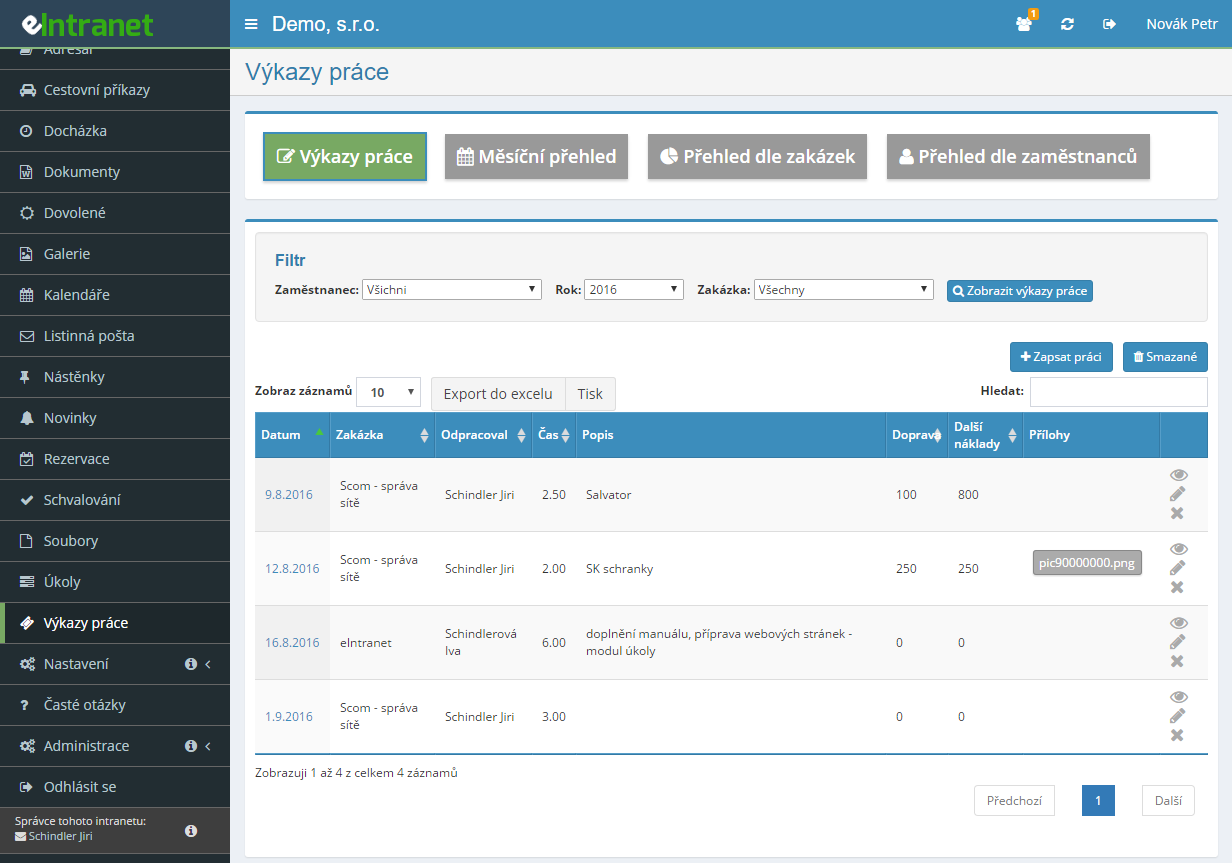
An employee records the hours worked against a job, a project or a CRM contact. Time can be entered as a decimal (1.5) or in hours and minutes.
The overview by job totals hours, travel and other costs for the invoice. The overview by employee shows the same thing from the payroll clerk's angle.
Standard work, overtime, weekend – give each rate a coefficient and the hours are recalculated by themselves in the overviews.
Save the monthly overview to XML for further processing and the timesheet table to XLSX. Exactly what is filtered gets exported.
What you can use the timesheets module for
-
Five views of the same data
Timesheets, monthly overview, by job, by employee, and statistics for any period. Each view has its own filter.
-
Travel and other costs on the entry
Alongside the hours you add mileage and materials in money terms. The overview footer totals them separately.
-
Bulk entry and copying
The form offers five rows at once and can be extended. A similar entry is copied with an icon and only the date changes.
-
Eight types of custom field
From a checkbox and a date through to an activity table holding several operations with a from – to time and a quantity.
-
A limit on backdating
Set the maximum number of days back, so timesheets do not get written up at the end of the quarter.
-
Record work straight from the job list
The job list carries a button for logging work. The job detail then shows every timesheet entry booked to it.
Time Tracking – Simple and Accurate Record of Worked Hours
The time tracking module in eIntranet.net allows you to quickly and reliably record employee work hours. With integrated invoicing and clear statistics, you get an instant overview of completed work, speeding up decision‑making and simplifying payroll management.
- Electronic Record Keeping – track hours without paperwork, saving up to 30 % of administrative time.
- Ongoing Project Monitoring – display work by projects and teams so it’s clear where resources are being used.
- Fast Invoicing – automatically convert recorded hours into invoices with adjustable rates (standard, express, etc.).
- Statistics and Reports – clear charts of hours worked for individual employees or projects that can be exported to Excel or PDF.
- Integration with the Task Module – link time entries to specific tasks and get a complete picture of project time requirements.
Simplify accounting, reduce errors, and increase work transparency in your company. Try the time tracking module today and see the difference in everyday operations!
Frequently asked questions
No. A statutory record of working time has to capture the start and end of each shift, of overtime, night work and standby. A timesheet, by contrast, records how many hours went to which job – not when the shift began and ended.
In eIntranet the separate Attendance module handles the record of working time. Timesheets sit beside it, not instead of it. Whether your setup matches what you need to evidence is for your payroll clerk or lawyer to judge.
No. The coefficient is a tool for internal recalculation and invoicing – setting an „overtime“ rate with a coefficient of 1.25 does not satisfy statutory overtime pay rules, which set their own minimum premium or compensatory time off.
Calculating pay remains a matter for payroll software and the payroll clerk. Rates exist so a company can recalculate hours for its own costing or for a customer invoice.
Yes, with the Record work in bulk button. The form offers five rows at once and the Add row button extends it. Empty rows are skipped automatically on saving.
The other option is copying: the icon on an existing entry opens a prefilled form where only the date and the number of hours need changing. For repeated work on the same job that saves most of the typing.
Both work. A value of 1.5 means an hour and a half; the time can equally be given in hours and minutes.
Only two fields are mandatory: who worked and how many hours. The rest – job, activity description, travel, other costs, note and attachments – are switched on in the module settings according to what the company needs.
Yes. The module settings define a maximum number of days back. Seven to fourteen days tends to be a sensible compromise: it leaves room for a late entry but does not allow a whole month to be written up.
It is the only safeguard against hours being estimated from memory at the end of a quarter – and thereby against the figures becoming useless for both invoicing and job costing.
Through the XML export. Switch to the Monthly overview view, choose the year and month, click Show overview and save the entries to XML below the table.
The other route is the Excel export via the button above the table – what is filtered gets exported, and the Column visibility button lets you choose beforehand which columns to include.
That is the default: closed jobs do not appear in the list for new entries. It stops somebody booking work to a job that has already been invoiced.
The module settings can change this behaviour if you need to record work on closed jobs. Think about it first, though – usually it is better to reopen the job than to work around it.
Yes. That is what the „Edit + view subordinates“ permission is for: it opens up the entries of subordinate employees but not the rest of the company.
The module has seven levels: no access, view own entries, edit, edit + view subordinates, view all entries, manager (plus deletion and export) and administrator (plus settings).
Yes, via a custom field of the Activity table type. Each activity takes a code, a from – to time and a quantity of operations performed; from that the system can derive the total time or additional costs.
There are eight types of custom field in all: yes/no, whole number, decimal number, date, list selection, activity table, single-line text and user selection. An administrator configures them.
No. The number of entries, jobs or rates has no effect on the price. That differs from specialised timesheet tools, which often bill per user and per project at once.
You pay for people – and on this module there are a lot of them, because everyone working on jobs has to report. Administrative staff who do not report need no account for this module's sake.
Registration is non-binding and includes a free 14-day trial of the application.