
Claim
Keep your claims under control


 Help
Help
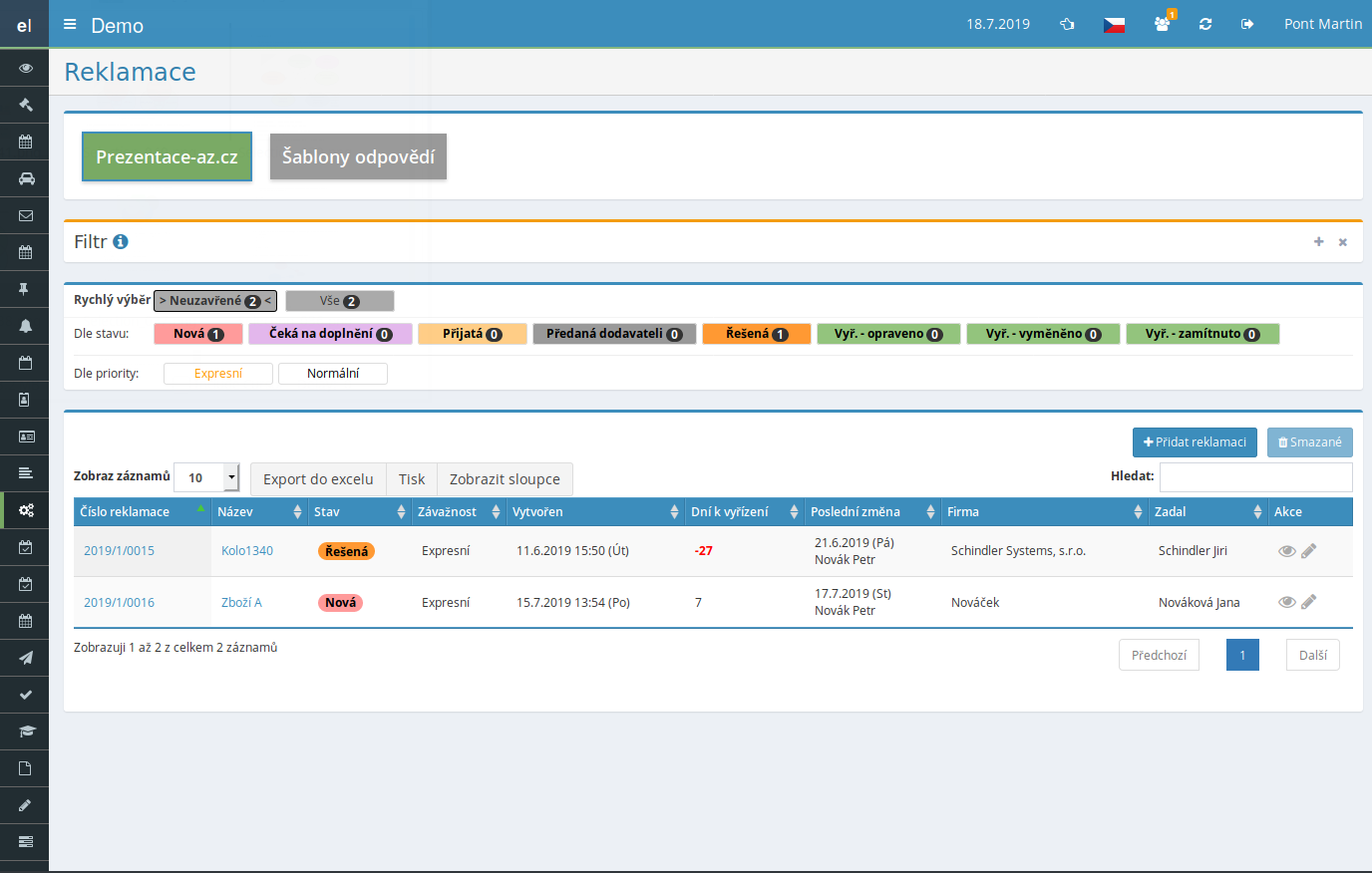
Our claims management software guides every claim through the whole process – from intake through resolution to closing. The customer and the handler both see the current status of the claim, so nothing gets lost in email threads.
Publish a link on your website and let customers submit claims on their own. A completed form creates the record automatically and the customer receives a confirmation email with a tracking link.
Set the number of days to resolve and the system starts counting from a chosen status. A few days before the deadline it alerts the handlers, so no claim ever runs past its legal limit.
Every status change or new entry sends an informative email to both the customer and the handler. You define the texts, subject and footer yourself, and messages can include variables with the data of each specific claim.
What is the claims module good for?
-
Multiple claim types with their own setup
Split claims into projects – for example products and service requests separately. Each type has its own statuses, severities and access rights.
-
Response templates
Prepare replies including attachments and insert them with a single click. The text supports variables such as the claim number, customer name or days left to resolve.
-
Color-coded statuses
Define your own statuses from "New" to "Resolved" and assign them colors. The overview instantly shows what is waiting and what is done.
-
Automatic and manual entry
Claims arise either from the web form or your staff create them manually based on a phone call or in-person drop-off.
-
History of changes and communication
Each claim keeps a complete record of steps, notes and attachments. Internal notes stay hidden from the customer.
-
Export and print
Export claims to XLSX based on the current filter or print the detail of an individual case for your records.
-
Custom numbering series
Instead of automatic numbering, set your own format with a prefix, year and sequence number to match company conventions.
Connection with other modules
Claims don't stand alone – they link with the rest of eIntranet and draw on data you already have in the system.
Clear and Simple Management of Your Customer Complaints – a module that allows you to quickly and effectively manage the entire complaint process within a single cloud ERP platform, eIntranet.net. With a centralized system, you can keep all complaints under control, reduce resolution time, and minimize the risk of errors.
Key Features and Benefits:
- Create and edit response templates that shorten response time to complaints by up to 30 %.
- Set up complaint projects by department or product type – each project has its own workflow and status codes.
- Comprehensive definition of complaint statuses (received, in progress, resolved) with the option for automatic notifications.
- Option to enter requests automatically or manually directly from e‑mail or a web form – customers and internal teams do not need to log in.
- Integrated reports that give you an overview of trend areas and help optimize processes.
Try the complaints module in eIntranet.net and gain quick access to information, reduce complaint processing costs, and increase customer satisfaction. Register now and start managing complaints simply.