

 Slovak
 Hungarian
 Polish
 German
 Spanish
Payroll
Run payroll from attendance to payslip
 Help
Help
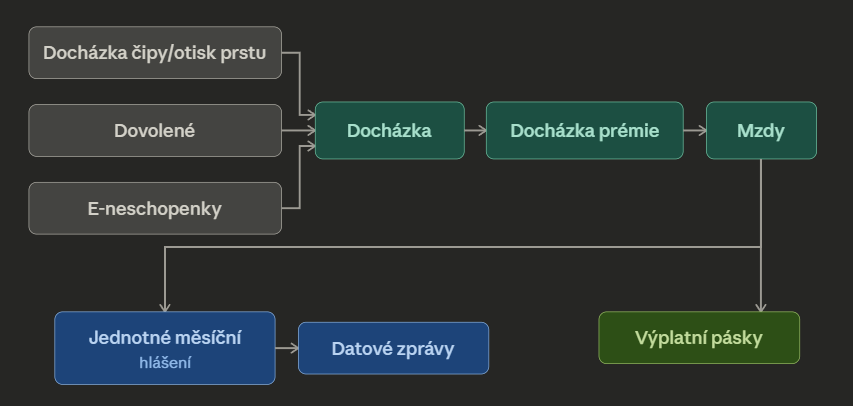
The Payroll module works out both gross and net wages exactly as the Income Tax Act and social and health insurance rules require. It handles full-time contracts as well as the DPP and DPC agreements, each with its own calculation logic.
Overtime, night shifts, weekends and holidays are valued automatically with the correct coefficient. Add bonuses, service surcharges, travel costs or on-call pay and the system folds them into the paycheck.
Send the monthly social insurance overview (JMHZ) and employee registration (REGZEC) straight from eIntranet. Health insurers receive an XML report, while the REGZEC submission travels through the data box.
From confirming attendance through approving bonuses, generating the wage and signing it off, all the way to dispatching the reports. Each step has an owner, so nothing slips through the cracks.
What you can use the Payroll module for
-
Tax reliefs in a few clicks
Taxpayer, children, disability, severe disability, spouse and student. Just set the entitlement for an employee and the relief is applied in the calculation.
-
Benefits built into the payout
Meal voucher lump sum, home office allowance, company car and pension contribution are kept in one place and factored into the wage when it is processed.
-
Bulk payroll processing
Generate, approve and mark wages as paid for the whole team at once. Month-end close takes a fraction of the time.
-
Payslips and exports
Payslips in PDF, an overview in Excel and a bulk bank order in the ABO format. Everything ready to send.
-
Tax payments for the tax office
Export income tax advances as a payment order and upload it directly into your online banking.
-
XML for every Czech insurer
VZP, Argus, Triton and other insurers get a monthly report in the right format. No retyping into external portals.
How it connects with other modules
The Payroll module builds on the other parts of eIntranet and draws the inputs it needs from them.